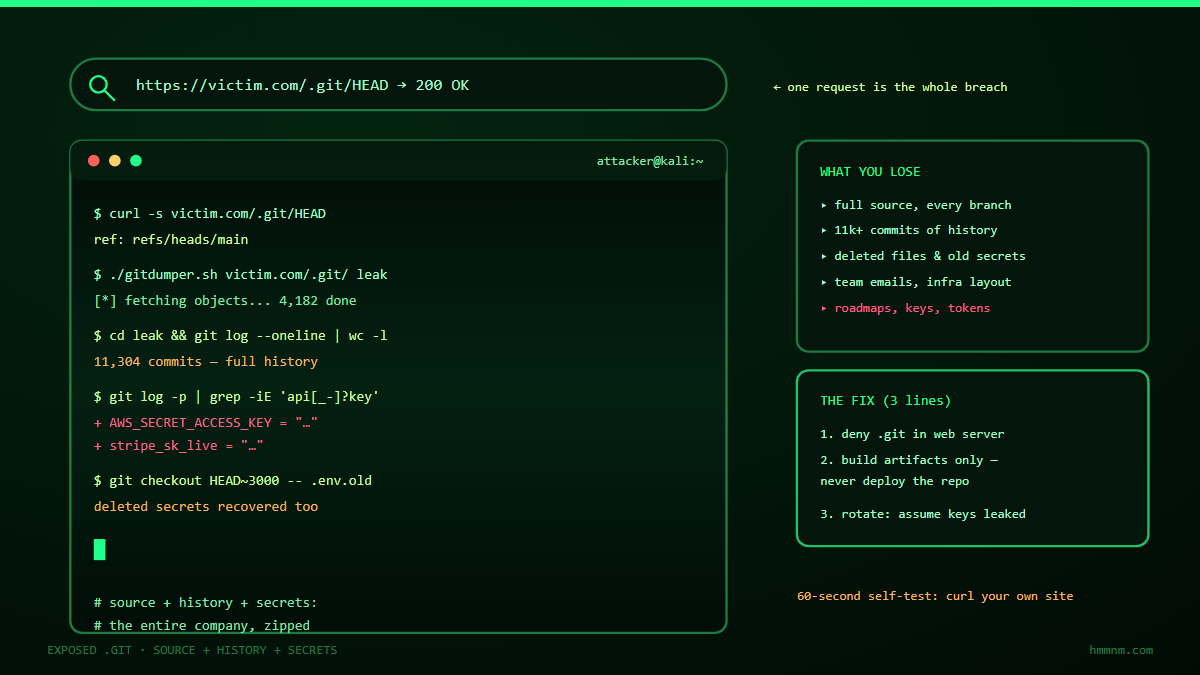
An exposed .git directory turns any visitor with curl into a person holding your complete source code, the full commit history of every developer, and — in most repos we’ve inspected over ten years of testing — at least one working credential. The mistake happens at deploy time (rsyncing the project folder instead of the build output) and it persists for years because nothing errors, nothing alerts, and the folder is invisible to normal browsing. The fix is three lines: block .git in the web server config, deploy artifacts not working directories, and treat every secret that ever touched a leaked repo as burned.
There is a mistake so common in web deployment that it has its own dedicated tooling on the attacker side, its own conference talks going back a decade, and its own checkbox on essentially every web application assessment we run. It looks like this: https://example.com/.git/HEAD returns ref: refs/heads/main. That’s it. That one line of plain text means the entire version-control database of the production website is downloadable by anyone who asks — source code, every commit message, every developer’s email address, deleted files, abandoned branches, and, more often than not, AWS keys that still work.
Ten years of published research and our own testing say the same thing: this vulnerability is not aging out. It’s not a legacy-only problem that modern CI/CD pipelines solved. Sites built last month ship with it. This article covers why .git exposure keeps happening, exactly how attackers turn it into code execution (not just source disclosure — often the fastest path to a shell), how to check whether your estate is affected, and the fixes that actually close it.
Why .git Exposure Keeps Happening After 10 Years
To understand the persistence of this bug, you need to understand what a .git directory actually is. When a developer runs git clone and then deploys, the folder that reaches the web server contains both the visible application files and a hidden subdirectory — .git/ — which is the entire version-control database in miniature:
objects/— every version of every file ever committed, zlib-compressed, content-addressedconfig— remote URLs, sometimes credentials in URL form (https://user:token@...)index— the full staging manifest of the working treeHEAD,refs/,packed-refs— branch and commit pointerslogs/— the reflog, a forensic goldmine of usernames, timestamps, and email addresses- sometimes
ORIG_HEAD, stashes, hooks, and — on machines where a helper cached a personal access token — a.git/credentialsfile
None of this is encrypted. The entire security model of Git assumes the .git folder travels only over channels you already trust. The web server has no idea it’s special — it’s just a directory full of files it will happily serve on request, though in most configurations directory listing is off, which is precisely why administrators believe they’re safe. Directory listing being disabled does not matter even slightly, because Git’s internal file structure is guessable: you don’t need a listing, you need only HEAD, then follow the pointers (that’s how automated scanners enumerate it — and why dir-listing-off creates an illusion of safety that has lasted a decade).
The reason it keeps happening is that nothing in the normal workflow errors:
| Step | What happens | Who notices |
|---|---|---|
| Dev clones repo locally | .git created silently |
Nobody — it’s hidden by default |
| Dev builds artifact … or doesn’t | Many stacks run straight from source (PHP, Node, Ruby) | Nobody |
| Dev rsyncs/copies folder to server | Hidden dotfolders ride along | Nobody |
| Server serves the tree | .git served as static files |
Nobody |
| Attacker downloads it | Full source + history + secrets | You, months later |
No CI step fails. No log spikes. The site works perfectly. The mistake is invisible in every direction except the one that matters — inbound requests for .git/HEAD.
And it is not rare. Ten-year retrospectives on exposed Git repositories (the “Exposed Gits” genre of research) keep finding hundreds of thousands of affected hosts on scans of the public internet, year after year, with concentrations in exactly the stacks that deploy-from-source: PHP CMSes and custom apps, Node/Express, Ruby, and misconfigured static-site generators. The half-life of an exposed .git is measured in years, because it’s a bug that produces no symptoms for its owner.
How Attackers Actually Exploit It (Step by Step)
Source disclosure alone would be bad enough — intellectual property, infrastructure details, hidden endpoints, hardcoded secrets. But the real danger of .git exposure is that it’s frequently the fastest route to code execution on the host. Here’s the canonical attack chain, the one with public proof-of-concept tooling (“git grabbers” of various vintages):
- Fetch
HEAD—curl https://target/.git/HEAD→ref: refs/heads/main. Confirms exposure instantly. - Walk the object graph.
refs/heads/mainnames a commit hash; the commit object lives inobjects/ab/cdef...(or a pack file); each commit points to a tree; trees recurse into blobs. Every step is deterministic — an attacker (or a 30-line script) reconstructs the entire repository, including deleted files, locally with plain HTTP GET requests. - Restore the working tree. Point a local Git at the downloaded object store (
git checkout/git reset --hard) and you now have the exact source running in production, at the exact deployed commit — including uncommitted-looking config files if the index is downloaded too. - Mine the history.
git log -pacross ten years of commits. Secrets rotate slower than code changes: the database password committed in 2019 “temporarily,” the debug route merged and disabled six months later, the internal admin path, the vendor API key “so the tests pass.” - Pick a technique. From here the repo is attacker-controlled source code of a live application. Two exploitation branches dominate:
- Credential reuse: the found AWS/SMTP/SMS-provider key works (or still works in an old backup of the environment config). No application exploit needed at all.
- Code execution via the app itself: with full source, find the vulnerable endpoint (an unserialize, an file upload path, an eval-ish template) and exploit it with zero guesswork — the exploit is written against the actual code running in production.
The critical, repeatedly-demonstrated step for total compromise is that with the source, the attacker’s exploit success rate goes from “maybe” to “certain.” Public proof-of-concept write-ups (“Pwning Git”) demonstrate going from .git/HEAD to a web shell in minutes on vulnerable deploys. Defenders should assume that an exposed .git plus any exploitable bug in the codebase equals full server compromise, because that is the standard outcome.
There’s one more nasty detail: a leaked .git/config sometimes reveals internal repository remote URLs (GitLab self-hosted, private GitHub) and even embedded basic-auth credentials — meaning the initial leak pivots into your source-control platform, where the real crown jewels (every other project, CI variables, plus the ability to open pull requests) live.
The Victim List Nobody Counts
Banks have leaked it. Governments have leaked it. Fortune-500 storefronts, room-booking platforms, universities, hospitals, and edge appliances ship with it every year. The bug writ large shows up in breach postmortems under euphemisms — “repository configuration error,” “deployment misconfiguration” — so the public victim list undercounts the private one.
What makes .git exposure corrosive isn’t any single incident. It’s that the misstep is systemic: the same junior developer rsync mistake, repeated at every company, forever, because deployments are copied from previous deployments like family recipes. The ten-year retrospectives exist precisely because each generation rediscovers the bug in its own stack — jQuery-era PHP apps, then Rails, then SPA build pipelines that accidentally included the repo root, then container images whose COPY grabbed more than intended, then infrastructure-as-code templates that codified the mistake at scale (a template with the flaw replicates it across every site spawned from it).
How to Check If You’re Exposed (60 Seconds)
The self-check is trivial and should be part of every deployment smoke test:
- The one-liner:
curl -s https://yoursite/.git/HEAD— anything other than a 404/403 is an incident. Check HTTP and HTTPS both, every vhost, every staging host, and every forgotten subdomain (staging is the classic:staging.anddev.hosts are exposed .git’s best friend). - The broader sweep: if you own many properties, a quick scan for
/.git/HEADacross your wildcard certificate’s SAN list and passive-DNS inventory finds the stragglers. Commercial attack-surface tools all include the check; the free way iscurlin a loop or one of the open-source .git checkers. - Don’t forget where the check applies: the bug lives at the web-deployment layer, so also check S3/Google-cloud-storage static sites (a synced folder replicates the mistake into object storage), GitHub Pages-style generators that copy the repo root, and container images (
grep -r ".git" /in the image). - If you find one: don’t just block it. Treat it as a breach-presumption incident: assume the repo was downloaded at some point during the exposure window, and rotate every secret that has ever existed in that repository’s history (next section).
The Fix: Three Layers That Actually Work
Layered fixes, in order of leverage:
1. Block .git at the web server (stop the bleeding)
location ~ /.git { deny all; return 404; }
Apache equivalent: RedirectMatch 404 /. (or <DirectoryMatch "^/.*/."> Require all denied </DirectoryMatch>). Return 404, not 403 — a 403 confirms the folder exists and invites deeper enumeration; 404 makes you look like every other site. For S3-style static hosting, add an explicit deny bucket-policy statement for keys prefixed .git/. Lighttpd/Caddy/IIS all have equivalents; the principle is identical: the web server must refuse to serve anything under .git/ (and .svn/, .hg/, .DS_Store, Thumbs.db while you’re at it).
2. Deploy artifacts, not working directories (remove the fuel)
The structural fix: your web server should never see a .git in the first place.
- Build a deployment artifact (tarball/container image/static bundle) in CI and ship that. The artifact contains the output of the build, not the developer’s working folder.
- If you deploy-with-git on purpose (some teams
git pullon the server for simplicity), constrain it: a separate deploy user, the repo outside the web root with a symlinkedcurrent/release dir (Capistrano-style), so the web root contains only the release. - Add a CI gate:
if [ -d "$ARTIFACT/.git" ]; then exit 1; fi. This is the single highest-value line in this article — it converts an invisible mistake into a failed build with a red X.
3. Edge and estate rules (belt and braces)
If you inherited an estate of unknown deployments, ship both: the web-server block everywhere (mass-fixable with config management in an afternoon), and the CI gate for everything new. Then use your CDN/WAF as a third layer — most can be configured with a path rule that blocks /.git at the edge before requests even reach origin (effective, but treat it as a seatbelt, not the brakes: origins change, and direct-to-origin scans bypass CDNs).
What To Do the Morning After You Find One
Assume downloaded. Act accordingly:
- Block access immediately (the server rule). Preserve the
.gitfolder itself for forensics — don’trm -rfit before noting its mtime and pulling access logs. Access logs for/.git/requests (look forHEAD,objects,config,logs/HEADpaths) give you your exposure window. - Rotate everything, including history. Not just current secrets: every credential that has ever appeared in the repo’s history. Tools exist to automate secret-scanning across full git history (trufflehog, gitleaks); run one, then rotate in order of blast radius: cloud keys → database passwords → third-party API keys → internal URLs exposed in config.
- Patch the code you didn’t know was public. The exposure window started when the folder arrived on the server; any vulnerability fixed in the repo since then was exploitable by anyone who grabbed the repo earlier. Review security-related commits inside the window.
- Notify deliberately. Depending on what leaked (personal data in exports? regulated keys?), your disclosure obligations may trigger. Get legal in the loop early for large exposures.
FAQ: Exposed .git Repositories
How do I check if my site exposes .git?
curl -s https://yoursite/.git/HEAD should return 404. If you see ref: refs/heads/... in the response, you’re exposed. Directory listing being off does not protect you: Git’s internal paths (HEAD → refs → objects) are deterministic, so scanners walk them without a listing. Check every vhost, every staging/dev subdomain, and object-storage static sites too.
Isn’t blocking .git in nginx enough?
It’s necessary but not sufficient. The block stops the download but doesn’t clean up the secrets that were exposed before the block, and it does nothing for the next server someone deploys without the rule. Pair it with the CI artifact gate (exit 1 if .git lands in a build output) so the mistake can’t reach production again, and treat any prior exposure as a credential-rotation event.
If there are no secrets in my repo, is exposure harmless?
No. Source disclosure alone gives attackers the exact code running in production, which converts any latent vulnerability from “maybe exploitable” to “reliably exploitable” — they can read the sanitisation logic, find hidden admin routes, and craft exploits with no guesswork. It also leaks internal architecture, developer identities, and often internal remote URLs from .git/config. Assume source + any bug = compromise.
What’s actually inside a leaked .git directory?
The entire version-control database: every version of every file ever committed (objects/), full commit history with author emails and timestamps, deleted files and abandoned branches, the staging manifest (index), reflog entries, and sometimes credentials cached in config or URL-embedded tokens. An attacker reconstructs your complete repository locally — including everything you deleted — using only HTTP GETs.
Can attackers modify my site through an exposed .git?
The directory itself is usually read-only through the web server, so the direct path is disclosure, not writes. The exceptions: .git/config with credential URLs can pivot into your source-control platform (where they can open PRs), and any file-upload path into the web root can overwrite .git hooks/config for post-exploitation persistence. The realistic chain is leak → find bug in source → shell — the PoC tooling for that chain is public and mature.
How is this still a thing after 10 years?
Because it’s an invisible mistake with no error, no alert, and no symptom until someone else notices. Deployment patterns are copied like family recipes; stacks that run-from-source (PHP, Node, Ruby) make the whole repo the docroot; and infrastructure-as-code has now templatised the mistake at scale. The ten-year retrospectives keep finding six-figure host counts for the same reason smoke detectors get found dead in post-fire inspections: everyone assumed someone else had tested it.
Key Takeaways
.git/HEADreturning aref:line means your full source, history, and likely secrets are public. Directory listing off does not protect — Git’s internal structure is walkable by design.- The bug happens at deploy time and hides for years: rsync of a working folder, no CI error, no log spike, no symptom. Only the inbound request pattern reveals it.
- Assume exposure = downloaded = credentials burned. Rotate everything in repo history (automated history scanners), not just current secrets, and review vulns fixed during the exposure window.
- Fix in layers: 404 (not 403) on
/.gitat the web server and a CI gate failing builds that contain.gitand optional edge/WAF path rules. Artifact-based deploys remove the fuel entirely. - Check everywhere: every vhost, staging/dev subdomains, object-storage static sites, and container images — the mistake replicates into every corner deployment recipes touch.
References
- “Exposed Gits: 10 Years on” — retrospective scanning research on a decade of public .git exposure
- “Pwning Git: A PoC” — proof-of-concept demonstration of .git download to code execution
- Git documentation — internals: objects, refs, index, reflog (what exactly leaks)
- TruffleHog / GitLeaks — open-source secret scanning across full git history
- OWASP — guidance on version-control metadata exposure in deployment checklists
- Internal: One Key to Rule Them All — what attackers do with the credentials an exposed repo hands them
{“@context”:”https://schema.org”,”@type”:”FAQPage”,”mainEntity”:[{“@type”:”Question”,”name”:”How do I check if my site exposes .git?”,”acceptedAnswer”:{“@type”:”Answer”,”text”:”Fetch https://yoursite/.git/HEAD with curl. A 404 or 403-with-block is the goal; if you see ‘ref: refs/heads/…’ your version-control database is downloadable. Directory listing being disabled does not protect you — Git’s internal paths are deterministic, so scanners walk them without a listing. Check every vhost, staging subdomain, and object-storage static site.”}},{“@type”:”Question”,”name”:”Isn’t blocking .git in nginx enough?”,”acceptedAnswer”:{“@type”:”Answer”,”text”:”It is necessary but not sufficient. The block stops future downloads but does nothing for secrets exposed before the rule existed, and the next deployment can repeat the mistake. Pair the block with a CI gate that fails any build artifact containing a .git folder, and treat prior exposure as a credential-rotation event.”}},{“@type”:”Question”,”name”:”If there are no secrets in my repo, is exposure harmless?”,”acceptedAnswer”:{“@type”:”Answer”,”text”:”No. Full source disclosure converts latent vulnerabilities into reliably exploitable ones — attackers read the exact sanitisation logic, hidden routes, and architecture running in production and craft exploits with no guesswork. Combined with any exploitable bug, the standard outcome is full server compromise.”}},{“@type”:”Question”,”name”:”What is actually inside a leaked .git directory?”,”acceptedAnswer”:{“@type”:”Answer”,”text”:”The entire version-control database: every version of every file committed (including deleted files and abandoned branches) in objects/, the full commit history with author emails, the staging manifest, reflog entries, and sometimes credentials in .git/config or URL-embedded tokens. An attacker reconstructs the complete repository locally using only HTTP GET requests.”}},{“@type”:”Question”,”name”:”Can attackers modify my site through an exposed .git?”,”acceptedAnswer”:{“@type”:”Answer”,”text”:”The direct path is disclosure, not writes — but .git/config can leak source-control credentials that pivot into your git platform, and the leaked source reliably leads to code execution through any bug it reveals. Public proof-of-concept tooling walks .git/HEAD to a web shell in minutes on vulnerable deploys.”}},{“@type”:”Question”,”name”:”How is this still a thing after 10 years?”,”acceptedAnswer”:{“@type”:”Answer”,”text”:”Because it is an invisible mistake: no error, no alert, no symptom on the owner’s side. Run-from-source stacks and copy-paste deployment recipes keep regenerating it, and infrastructure-as-code templates now replicate the flaw at scale. Retrospective scans keep finding six-figure host counts for exactly this reason.”}}]}
Part of our Web Application Pentesting: The Complete Guide series.
- CitrixBleed CVE-2023-4966: Session Tokens Straight From Memory
- WhatsApp’s 2022 Ring-Phase RCE: Code Execution Before You Answer
- WinRAR’s 19-Year-Old Bug: When Legacy Code Turns Lethal