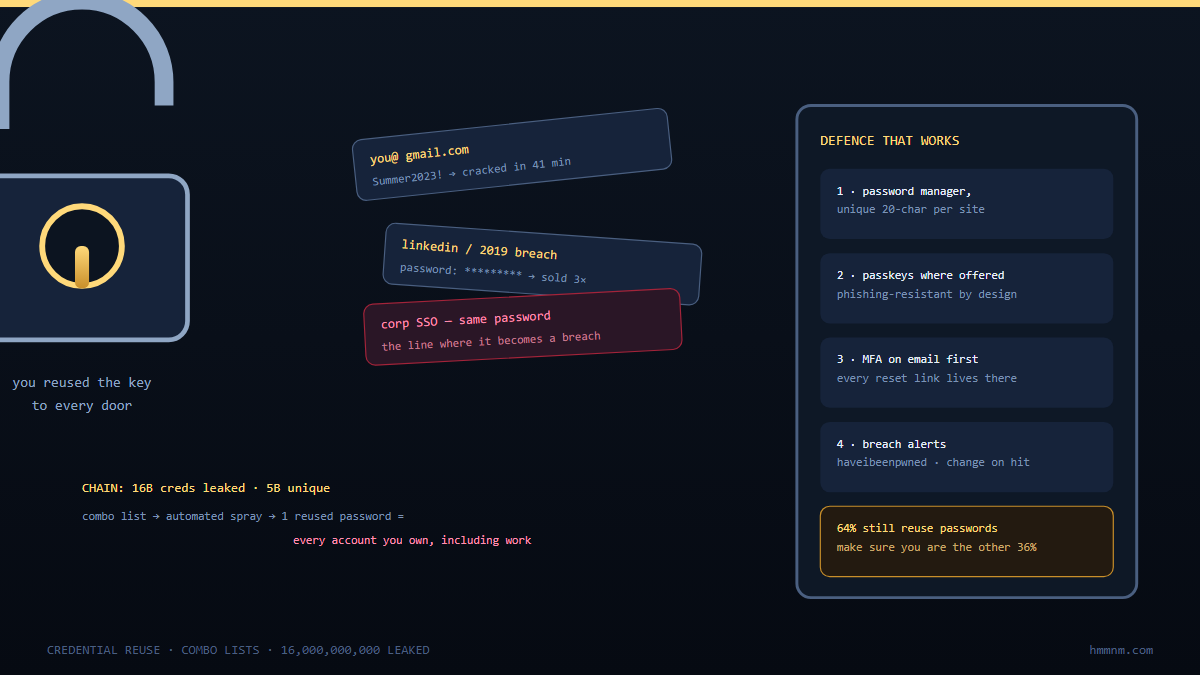
When a breach database leaks, it enters an industrial pipeline: initial-access brokers and combo-list compilers deduplicate and index it within hours, credential-stuffing crews test it against banks, email, and retail logins, infostealer logs get cross-joined against corporate domains, and whatever works gets resold or fed to account-takeover tooling — often before the breached company has even finished its investigation. Your leaked row matters because attackers don’t want your data; they want your password’s reuse against everywhere you log in. Defence: unique passwords via manager, phishing-resistant MFA on anything valuable, breach-feed monitoring (have-i-been-pwned-style), and corporate side — checking employee emails and stealer logs against your identity providers before criminals do.
Somewhere on your desk, metaphorically speaking, is a spreadsheet row with your email, a password, and a timestamp. It has been copied between databases four times, indexed twice, tested against three banks and one streaming service, and its contents replayed against your employer’s VPN. None of this required the original breached company to fail twice — the breach happened once, years ago, and the asset has been appreciating in criminal markets ever since.
Most people imagine a breach as an event: attackers got in, data got out, statement got issued, over. The reality: leaked credentials are a commodity with a supply chain. Combolists are compiled, then checked (“verified”) against live logins. They are enriched with what the checking reveals — balance, subscription status, mail access — then priced accordingly and resold down a chain until every drop of value is squeezed. Understanding that chain is the only way to make rational decisions about password hygiene, MFA, and what to actually do when the inevitable notification email arrives. This article walks the pipeline end-to-end — and the corporate mirror-image your security team should be running.
Stage 0: How Databases Get Out
The origin stories repeat:
- SQL injection and credential-stuffing-compromise loops — the classic: app compromised, user table exfiltrated (emails, password hashes or, catastrophically, plaintext).
- Cloud-storage misconfigurations — backups and exports on open buckets make the entire user table public without any “hack” in the dramatic sense.
- Infostealer logs — no database breach at all: malware on your device siphoned the browser’s plaintext password store and live session cookies directly; these logs circulate fresher and richer than most breach dumps.
- Insider and third-party leakage — support tools, marketing exports, CRM syncs; your data left via a vendor you never knew existed.
The important mental shift: the hash-vs-plaintext question matters less every year. Hashing matters most here. Weak schemes (unsalted MD5/SHA1 or fast hashes) crack at billions of guesses per second on rentable GPU fleets. Modern hashing (bcrypt/argon2, salted, work-factored) slows bulk cracking. But it cannot protect the user whose password was already weak, or already plaintext in an infostealer log. And cracking is now selective : attackers don’t crack everything, they crack accounts worth cracking — and “worth” includes your employer’s VPN reuse.
Stage 1: Compilation and the Combolist Economy
Raw breach dumps are messy: different formats, duplicates, dead emails. The first processing tier turns chaos into inventory:
- Parsing and normalisation — email:password pairs (and pair:hash variants) extracted into common formats.
- Deduplication and merging — your row appears once per unique credential you’ve ever reused; the compilations effectively become a credential biography of the internet, updated per breach.
- Combo lists — merged, cleaned email:password lists optimised for automated testing at scale (the “combos” sold on forums and Telegram channels).
- Segmentation by value — banking-adjacent domains, corporate domains, government, gaming, streaming; each segment prices differently. A corporate-domain row is worth multiples of a consumer one — because of exactly what happens in Stage 2.
This tier is why “it was only a hash” and “the data was old” both age badly: the compilations don’t expire, they accrete . A 2016 leak and a 2024 infostealer log get joined on your email tonight. The join result — today’s password, possibly with a live session cookie attached — is what gets sold.
Stage 2: Verification — Where Your Password Gets Tested
Combolists are raw ore; verified credentials are the refined metal. Testing (“checking”) runs the list against real login endpoints:
- Credential stuffing at industrial scale — distributed across residential-proxy networks to dodge rate limits and geo-blocks, with request patterns shaped to mimic real browsers. Every 404-free 200-with-session is a hit.
- Target selection logic — banks and payment rails (balance checks appended), email providers (an inbox is a skeleton key: reset everything reachable), corporate SSO/VPN/OWA (a corporate hit is an initial-access product), streaming and gaming (volume play).
- Enrichment — hits get annotated: account balance, mail rule set, payment methods, MFA present or absent. MFA-absent hits are premium; MFA-present hits may get batched for real-time phishing or OTP-prompt-bombing instead.
- Session-cookie attachment — infostealer-derived entries often bypass password checks entirely: an active-session cookie is a working login, no password required, no failure counter tripped.
The economics: checking costs pennies per thousand attempts; conversion rates of 0.1–2% on aged combos are plenty. This is the stage where the original breach becomes your problem. The moment of leak-week news coverage is not the danger window. The danger window is every day after, forever, in automated bursts against every login you own.
Stage 3: Monetisation — What Actually Happens to a Working Login
Verified credentials flow into channels by value:
| Account type | Typical fate | Notes |
|---|---|---|
| Email inbox | Reset-harvesting, spam platform, long-term persistence | Inbox access multiplies value of everything else |
| Bank / fintech | Direct theft attempts, mule transfers, sold per-balance | Often resold per-region to specialists |
| Corporate SSO / VPN / mail | Packaged as “initial access” listings | Priced by company size; feeds ransomware affiliates |
| Streaming / gaming / social | Low-value resale, spam, scam props | Volume business |
| Merchant accounts (eBay-style classifieds, marketplaces) | Payment-fraud and scam-platform abuse | The Gumtree-class leaks: not just data loss, active fraud enablement |
Two wide-angle patterns from the case files worth internalising:
- Consumer-marketplace leaks enable fraud on other people. A classifieds-site credential dump doesn’t just expose listings; the stolen accounts become the impersonation layer for scams — fraudulent listings, fake escrow services, payment-diversion replies — where the account’s aged reputation is the weapon. Victims are on both sides of the leak.
- Private payloads dwarf public breaches. For every publicised mega-dump, orders of magnitude more data circulates privately: infostealer logs indexed in cybercrime-accessible panels, sold or subscription-quarried by domain (“give me every credential for acme.com”). Your row may already be in private circulation from a breach nobody announced.
Stage 4: The Corporate Mirror — What Your Security Team Should Run
The same pipeline runs against employers, and the defence is to run the intelligence loop inward:
- Subscribe to breach and stealer-log intelligence — HIBP-style domain monitoring for corporate emails, plus commercial stealer-log feeds that cover private-circulation data. Check continuously, not after news breaks.
- Assume cross-contamination — employees reuse passwords between personal and corporate identities; a consumer-breach row with corporate-mail reuse is your incident, not their inconvenience. Force reset on any hit, and look for corresponding authentication anomalies in the window.
- Watch authentication telemetry for the stuffing signature — bursts of failed logins from residential IPs across distributed ASN ranges, login successes from geographically impossible pairs, new-MFA-enrollment spikes (post-takeover persistence).
- Kill the password where it matters — phishing-resistant MFA (passkeys/FIDO2/hardware keys) on VPN, mail, admin consoles; conditional-access policies that make a bare password insufficient even when it’s right.
- Prepare the user-side playbook too — breach-notification guidance that actually says what to do (below), because your employees’ personal rows are your perimeter’s soft underbelly.
What To Do When Your Row Leaks (Personal Playbook)
The notification email is not the incident; the testing is. Act accordingly:
- Change the password at the breached service — and everywhere else you used it (assume the combo compilers already made the join; you’re racing their schedule, not the news cycle).
- Unique-password everything via a manager. Reuse is the vulnerability; memory was the reason for reuse; kill the reason. (Password reuse across significantly-valued accounts is how one leak becomes ten takeovers.)
- Phishing-resistant MFA on email first — the inbox is the skeleton key; a passkey or hardware key there blunts almost the whole downstream chain. App-based and SMS factors are better than nothing but sit lower on the resistance ladder.
- Check exposure deliberately — HIBP and similar feeds for your addresses; treat “your email appeared in a stealer log” as device compromised at the time of logging, hunt backwards, and rotate sessions.
- Watch the quiet aftermath — password-reset emails you didn’t request, new-device notifications, mail-filter rule changes; the second wave of account takeover often arrives weeks later, after the initial noise dies.
FAQ: Leaked Password Databases
What actually happens to my password after a breach?
It enters a processing pipeline. The data is normalised into combo lists and joined with other leaks and infostealer logs on your email. It is then tested automatically against banks, email, corporate, and retail logins via residential-proxy networks. Whatever the testing reveals is used to enrich the lists, which are resold by value tier. The original breached company matters less than the password’s reuse everywhere else — the pipeline’s real product is working logins , and reuse is what manufactures them.
Why do old breaches still matter?
Because credential compilations accrete rather than expire: a 2016 dump and a 2024 infostealer log get merged on your email, so your current password may sit beside your old one in the same row. Also, weak or legacy hashing schemes crack at billions of guesses per second on rentable hardware — “only hashes” and “old data” both degrade as defences with every GPU generation.
Do password managers really help if the breach is the server’s fault?
Yes — the breach leaks the service’s copy (hash, or plaintext if mishandled), but a manager ensures that copy is unique: it fails open nowhere else. Without reuse, the leaked row is inert outside the breached service. Managers also enable long random passwords that resist selective cracking of weak hash schemes, which is the second-half protection the service’s hashing can’t give you.
What is an infostealer log and how is it different from a breach?
An infostealer log is collected from your device by malware. It contains browser-stored passwords in plaintext, session cookies, autofill data, and sometimes wallet files. No server breach required. The cookies often bypass passwords and MFA entirely by replaying an authenticated session. If your email appears in a stealer log, assume the device was compromised at logging time and rotate sessions, not just passwords.
How does my employer get involved in my personal breach?
Through reuse: the corporate row in a combo list (email same as personal pattern, password shared) is an initial-access product. Corporate monitoring subscribes to breach/stealer feeds, force-resets on hits, and watches authentication telemetry for stuffing signatures. Employees’ personal password hygiene is genuinely on the corporate risk register — which is why good programs offer personal password-manager licences.
Is passwordless (passkeys) the end of this problem?
For the stolen-password pipeline, largely yes: passkeys are service-bound, phish-resistant, and there is no reusable secret to leak. The pipeline doesn’t disappear — it shifts toward session theft, stealer malware on device, and social-engineering recovery-path attacks against passkey accounts. But the specific commodity this article traces (reusable email:password rows) loses its market.
Key Takeaways
- A leaked credential is a commodity in a supply chain: compiled into combo lists, joined across breaches and stealer logs, verified against live logins at industrial scale, enriched, and resold by value tier — email inboxes and corporate SSO rows price highest.
- The danger window isn’t breach week; it’s forever after, in automated bursts — and private circulation (stealer-log panels, domain-indexed queries) dwarfs the publicised dumps.
- Reuse is the vulnerability the pipeline manufactures into takeovers: unique passwords via a manager make each leaked row inert outside its service; weak hash schemes make short passwords crackable regardless of the service’s promises.
- Protect the inbox first with phishing-resistant MFA — the inbox is the reset-harvesting skeleton key; passkeys/hardware keys on mail and corporate SSO blunt the highest-value channels.
- Run the corporate mirror: subscribe to breach and stealer-log feeds for your domain, force-reset on hits, watch for stuffing signatures in authentication telemetry, and treat employee personal-password hygiene as perimeter policy.
References
- Have I Been Pwned — breach aggregation and domain-monitoring model
- Hudson Rock / spycloud-class research — infostealer-log economy and domain-indexed credential access
- Microsoft Digital Defense Report — credential-stuffing volume and MFA effectiveness statistics
- OWASP — Automated Threats to Web Applications: credential stuffing (OAT-014)
- Case file: classifieds-marketplace credential leaks (Gumtree-class) — account reuse enabling payment-fraud impersonation
- Internal: One Key to Rule Them All — the privileged-credential sibling of this pipeline
{“@context”:”https://schema.org”,”@type”:”FAQPage”,”mainEntity”:[{“@type”:”Question”,”name”:”What actually happens to my password after a breach?”,”acceptedAnswer”:{“@type”:”Answer”,”text”:”It enters a processing pipeline: normalised into combo lists, joined with other leaks and infostealer logs on your email, tested automatically against banks, email, corporate, and retail logins, enriched with whatever the testing reveals, and resold by value tier. The original breached company matters less than the password’s reuse everywhere else — the pipeline’s real product is working logins, and reuse is what manufactures them.”}},{“@type”:”Question”,”name”:”Why do old breaches still matter?”,”acceptedAnswer”:{“@type”:”Answer”,”text”:”Credential compilations accrete rather than expire: a 2016 dump and a 2024 infostealer log get merged on your email, so your current password may sit beside your old one in the same row. Weak or legacy hashing schemes also crack at billions of guesses per second on rentable hardware, so only-hashes and old-data both degrade as defences with every GPU generation.”}},{“@type”:”Question”,”name”:”Do password managers really help if the breach is the server’s fault?”,”acceptedAnswer”:{“@type”:”Answer”,”text”:”Yes. The breach leaks the service’s copy, but a manager ensures that copy is unique — it fails open nowhere else. Without reuse, the leaked row is inert outside the breached service. Managers also enable long random passwords that resist selective cracking of weak hash schemes, which the service’s hashing cannot give you.”}},{“@type”:”Question”,”name”:”What is an infostealer log and how is it different from a breach?”,”acceptedAnswer”:{“@type”:”Answer”,”text”:”An infostealer log is collected from your device by malware: browser-stored passwords in plaintext, session cookies, autofill data, sometimes wallet files — no server breach required. The cookies often bypass passwords and MFA entirely by replaying an authenticated session. If your email appears in a stealer log, assume the device was compromised at logging time and rotate sessions, not just passwords.”}},{“@type”:”Question”,”name”:”How does my employer get involved in my personal breach?”,”acceptedAnswer”:{“@type”:”Answer”,”text”:”Through reuse: a corporate row in a combo list is an initial-access product sold by company size. Corporate monitoring subscribes to breach and stealer feeds, force-resets on hits, and watches authentication telemetry for stuffing signatures — which is why mature programs offer employees personal password-manager licences.”}},{“@type”:”Question”,”name”:”Is passwordless (passkeys) the end of this problem?”,”acceptedAnswer”:{“@type”:”Answer”,”text”:”For the stolen-password pipeline, largely yes: passkeys are service-bound, phish-resistant, and have no reusable secret to leak. The threat shifts toward session theft, on-device stealer malware, and social-engineering attacks on recovery paths — but the specific commodity of reusable email-password rows loses its market.”}}]}
Related Reading
Part of our Cyber Threat Intelligence & CVE Analysis: The Complete Guide series.