AI agents went from research demo to production workloads in under two years, and the vocabulary grew even faster. Reasoning patterns, memory types, harness components, protocols, metrics, and inference optimizations all get thrown around as if everyone agrees what they mean. They do not. This guide defines every core concept in the modern agent stack — from the Neural Network and Attention beneath every model all the way to KV Cache and Quantization — with a plain-English definition, an explanation of how it actually works, and a concrete example for each.
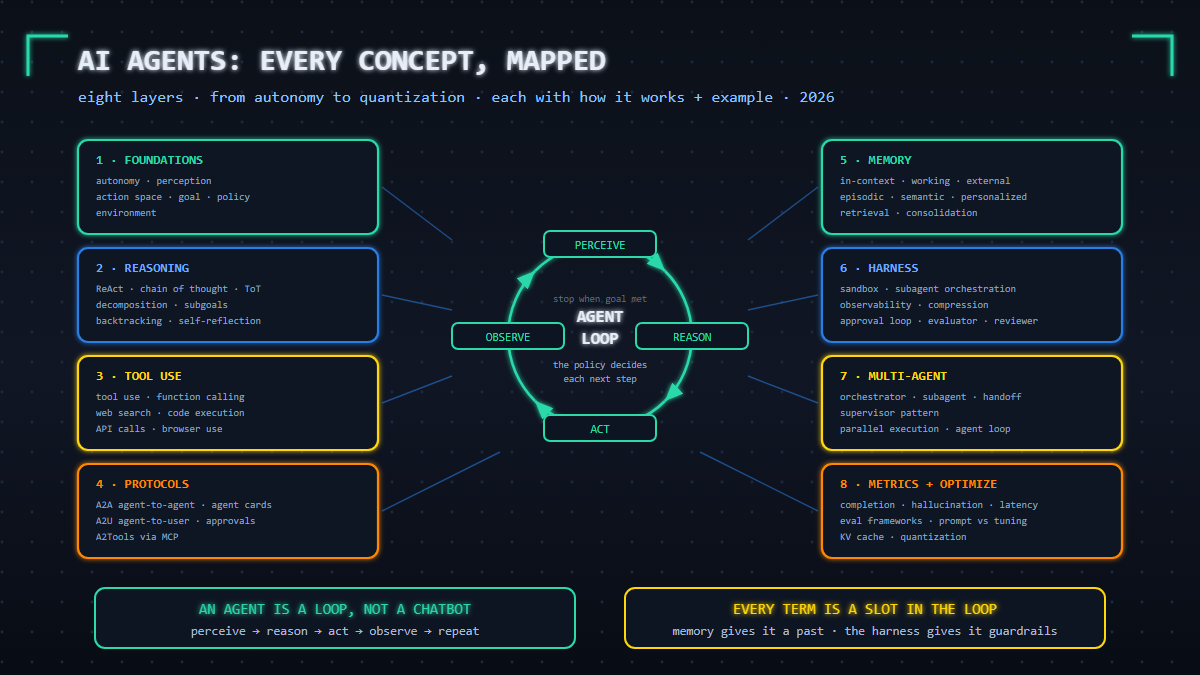
Read it as a reference map. Every concept occupies a slot in one machine: an agent is a loop, and everything below is machinery around that loop.
An AI agent is a loop, not a chatbot: a policy (model + instructions) pursues a goal by taking actions (tools, code, APIs, browser) inside an environment, observing results, and repeating until done. Everything else is machinery around that loop: memory gives the agent a past, the harness gives it guardrails (sandbox, approvals, observability), protocols (A2A for agents, MCP for tools) give it a common language, skills give it know-how, multi-agent patterns give it leverage, metrics tell you whether it works, and optimizations (prompting, fine-tuning, KV cache, quantization) make it affordable. Master the loop first — every concept on this page is a slot in it.
The concept map: nine layers of an agent system
Every term below fits into one of nine layers — 0 through 8. If you can place a concept in this table, you understand the stack:
| Layer | Core concepts | Question it answers |
|---|---|---|
| 0. The model beneath | Neural Network, Transformer, Attention, Attention Residual, LLM, Tokenization, Embeddings, Flash Attention, SLM, Titans, Recursive LMs, Diffusion (adjacent) | What sits under every layer above? |
| 1. Foundations | Autonomy, Perception, Action Space, Goal, Policy, Environment | What is the agent and what is it allowed to do? |
| 2. Reasoning and planning | ReAct, Chain of Thought, Tree of Thought, Task Decomposition, Subgoal, Backtracking, Self-Reflection, Plan and Execute | How does it think through a problem? |
| 3. Tool use | Tool Use / Function Calling, Web Search, Code Execution, API Calls, Browser Use | How does it act on the world? |
| 4. Communication protocols | A2A, A2U, A2Tools | How does it talk to other agents, users, and tools? |
| 5. Memory | In-Context, Working, External, Episodic, Semantic, Vector DB, RAG, Retrieval, Consolidation, Personalization | How does it remember and learn? |
| 6. Harness | Sandbox, Subagent Orchestration, Observability, Compression, Approval Loop, Evaluator, Reviewer | What surgically contains and checks it? |
| 7. Skills and multi-agent | Operational Procedures, Decision Heuristics, Normative Constraints, Orchestrator, Subagent, Handoff, Supervisor Pattern, Parallel Execution | How does it scale know-how and work? |
| 8. Runtime, metrics, optimization | Agent Loop, Trajectory, Streaming, Context Window Management, Rate Limiting, Fallback, Retry Logic, Task Completion Rate, Hallucination Rate, Tool Call Accuracy, Latency, Token Efficiency, Human in the Loop, Kill Switch, Prompt Engineering, Prompt Tuning, Fine-Tuning, Transfer Learning, PEFT, Lottery Ticket, LoRA, RLHF, Temperature, KV Cache, Eval Frameworks, Quantization, Meta-Harness Optimization | How does it run in production, how do you measure it, and how do you make it cheap? |
Layer 0: The Model Beneath
Agents sit on top of a trained model, and a handful of model-level concepts explain where its abilities come from: the network family it belongs to, the architecture that family converged on, the mechanism that makes that architecture work, what the “large” in large language model means, the format the model actually reads, and the numeric space where meaning lives.
Neural Network
A neural network is a computational system built from layers of simple mathematical units (“neurons”), where each unit multiplies its inputs by learned weights and passes the result forward — and where learning is nothing more than adjusting billions of those weights until the outputs match reality.
How it works: during training, the network is shown examples, its errors are measured, and each weight is nudged in the direction that reduces the error (gradient descent, applied layer by layer via backpropagation). No rules are handwritten: behavior — fraud detection, grammar, code style — condenses out of fitted weights. Depth matters because early layers pick up primitive features and later layers combine them into abstract ones.
Example: in a fraud-scoring network, early layers fire on raw signals (amount, merchant country, time of day) while deeper layers fuse them into “this smells like card testing” — a judgment nobody coded, learned from millions of labeled transactions.
Transformer
The transformer is the neural network architecture behind essentially every modern LLM. Its defining property is that it processes an entire sequence in parallel — every position can directly attend to every other position — instead of reading tokens one at a time.
How it works: older recurrent architectures carried information step by step, which was slow to train and leaky over distance. The transformer’s attention (below) gives every token a one-hop path to every other token, which makes training massively parallel on GPUs — and that parallelism, not raw intelligence, is what allowed models to scale from millions to trillions of parameters in half a decade.
Example: in “the certificate expired in March, but the service kept accepting it,” a recurrent model must carry “certificate” forward through many steps to interpret the final “it”; a transformer links “it” back to “certificate” in a single attention step, no matter how far apart they sit.
Attention
Attention is the mechanism inside the transformer that computes, for every token, how much every other token should matter — then builds a weighted blend of those tokens’ information as the token’s new, context-aware representation.
How it works: each token emits query, key and value vectors (learned projections of its embedding); matching a token’s query against all keys produces relevance weights, and the weighted sum of values becomes its output. Attention is also the source of the context-length cost wall: every token attends to every other token, so compute grows quadratically with sequence length — the exact inefficiency the KV cache (layer 8d) exists to blunt.
Example: in “the agent crashed because it ran out of context,” attention binds “it” strongly to “agent” and weakly to everything else. Pronoun resolution is not a grammar rule in the model — it is a product of attention weights.
Attention Residual (Residual Stream)
The attention residual is the design decision that defines the modern transformer: every sublayer adds its output back onto its input (x + F(x)), creating a running channel — the residual stream — that flows from the embedding to the output while each layer makes small edits to it.
How it works: without residual connections, gradients attenuate to nothing through dozens of layers; with them, each layer learns an incremental modification to a persistent workspace instead of rebuilding representation from scratch. Interpretability research treats the stream literally as a communication channel: attention heads and MLPs write features into it, later components read them out, and many features share the same neurons through superposition. This lens explains two everyday observations — models degrade gracefully when a single layer is damaged, and behaviors can sometimes be steered by editing stream activations directly.
Example: an agent keeps mangling multibyte filenames; activation patching traces the corruption to a specific layer writing a broken encoding feature into the residual stream — a mechanistic diagnosis that no amount of prompt tweaking would have surfaced.
Small Language Models (SLMs)
Small language models are compact models — roughly 0.5B to 7B parameters (the Phi, Gemma, Qwen, small Llama and SmolLM families) — engineered through ruthless data curation and distillation from frontier teachers to deliver capability far beyond their parameter count.
How it works: the recipe is data, not scale: training on textbook-quality and deliberately curated synthetic corpora (the “Textbooks Are All You Need” lineage), then distilling behavior from a large model into a small one. A 3-4B model at 4-bit quantization occupies about 2 GB and runs fully offline on a laptop or phone. The canonical agent pattern is the two-tier stack: a frontier model orchestrates, plans and verifies, while SLM subagents execute high-volume mechanical steps — classification, extraction, formatting — locally and nearly free.
Example: a 4B on-device model triages 30,000 support tickets overnight, resolves the routine 96% locally, and escalates only ambiguous cases to the frontier orchestrator — eliminating the bulk of per-token spend while keeping hard reasoning on the big model.
Titans: Memorizing at Test Time
Titans is a Google research architecture (announced December 2024) that attacks attention’s central weakness — the finite, quadratic-cost context window — by adding a neural long-term memory module that keeps learning while the model runs, memorizing at inference (“test”) time rather than only during training.
How it works: the memory module is trained online with a surprise-based signal: inputs that deviate from what the memory already expected are stored; routine inputs fade through a forgetting gate. The memory can be wired in three ways — as context, as a gate, or as a layer — and the paper demonstrates coherent behavior beyond two million tokens while attention pays only for what it attends to. Treat it as a research direction, not a shipped product: the significance is architectural, pointing at a future where the context window (layer 8’s hard wall) dissolves into a memory system that grows with use. The same memory-efficiency frontier that produced TurboQuant’s LLM memory math.
Example: an agent that must reason over a six-month incident archive cannot fit it in any window; a test-time-memorization design reads it sequentially, retains the surprising facts (an unexplained credential rotation), forgets the routine ones — and still answers questions about the whole archive afterward.
Recursive Language Models
Recursive language models reuse computation on the way to an answer — either architecturally, by looping a core block instead of stacking hundreds of one-shot layers, or behaviorally, by decomposing a problem and re-invoking the model on the subproblems.
How it works: the architectural flavor includes looped transformers and recurrent-depth designs that run a compact block many times, plus the linear-recurrent lineage (RWKV, Mamba) that carries state sequentially instead of attending to everything. The behavioral flavor is recursion as reasoning: the model splits “debug this failing build” into subquestions, answers each, and composes — chain of thought made explicitly self-invoking. The shared payoff is adaptive depth: easy inputs exit early, hard inputs spend more compute, and length generalization improves because the mechanism repeats rather than memorizes a fixed depth.
Example: a flat model produces one confident wrong guess on a stack-overflow-style crash; a recursion-capable model spawns subproblems — read the errno, check the syscall contract, diff the trace — and converges at recursive depth six, spending its tokens where the difficulty actually was.
LLM (Large Language Model)
An LLM is a transformer trained on vast amounts of text to do one thing extremely well: predict the next token. Everything the model appears to “understand” — grammar, facts, reasoning patterns, code — emerges from next-token prediction executed at sufficient scale, then shaped by post-training.
How it works: pretraining absorbs the corpus into weights; post-training (RLHF, below) turns the raw predictor into an assistant that follows instructions. For agents, the key property is the knowledge boundary: the model’s parametric memory is frozen at its training cutoff, so anything newer or organization-specific must come from tools and retrieval (layers 3 and 5) — the model is the reasoning engine, not the source of truth.
Example: an agent asked “what changed in v2.3 of this SDK?” will answer from stale weights and confidently invent specifics — until the Web Search tool (layer 3) is invoked and the answer becomes grounded.
Tokenization
Tokenization is the preprocessing step that splits raw text into tokens — words, sub-words or characters — and maps each to an integer ID that the model can process. Tokens are the model’s actual alphabet and the unit everything is measured in: context windows, pricing, rate limits and efficiency metrics are all token-denominated.
How it works: modern models use sub-word vocabularies (typically 50,000-100,000 entries) where common words are one token and rare words fracture into pieces. Practical consequences: English runs roughly one token per three-quarters of a word, many other languages cost two to three times more for the same sentence, and models famously fumble letter-level tasks (like counting the letters in a word) because they never see letters — only token IDs.
Example: trimming a verbose API response from 4,000 tokens to 800 (the token-efficiency lever in layer 8b) is not an aesthetic choice — it is a direct 5x cut on a bill measured per token, in a window measured in tokens.
Embeddings
An embedding is a list of numbers — a vector — representing a piece of text (or an image) in a mathematical space where semantically similar items sit close together. It is meaning converted into geometry, and it is the form in which a model can compute over meaning.
How it works: an encoder model maps text to vectors such that paraphrases land near each other and unrelated content lands far apart; similarity is then a cheap arithmetic operation (cosine similarity or dot product). Embeddings power semantic search, clustering, deduplication and — through the vector database (layer 5) — every memory-retrieval decision the agent makes.
Example: the query “how do I rotate certificates” retrieves “TLS renewal runbook” with high similarity even though no word overlaps — while “rotate the image 90 degrees” scores far lower despite sharing the word “rotate.”
Diffusion Models
A diffusion model is a generative architecture — today the standard for image, video and audio synthesis — that creates data by learning to reverse a noising process: start from pure random noise and iteratively denoise it into a clean sample.
How it works: training corrupts examples with gradually increasing noise while the model learns to predict and remove that noise; generation then runs the model in a loop, refining randomness into structure step by step. It earns a slot in an agent glossary for one honest reason: it is a different stack from the LLM one, but it powers the image- and video-generation tools that agents increasingly call — so it enters an agent system through the action space (layer 3), and its output is data, never instructions.
Example: a report agent hits “generate the architecture diagram”: the tool it calls is almost certainly a diffusion model; the image comes back as an observation, gets attached as an artifact — and is never executed or obeyed.
Flash Attention (and the AirLLM Family)
Flash Attention is an exact reformulation of how attention is computed: by tiling the computation through the GPU’s small on-chip SRAM, the full N-by-N attention score matrix is never materialized in slow GPU memory — identical mathematics, a 2-4x speedup, and memory that grows linearly rather than quadratically with sequence length.
How it works: naive attention writes an enormous intermediate score matrix to high-bandwidth memory and reads it back, drowning in memory traffic; Flash Attention loads blocks of queries, keys and values into SRAM, computes partial softmax results there, and rescales and merges them — an IO-aware algorithm from the hardware-algorithm co-design wave. It is a major reason 100k+ token contexts became servable at all, and it composes with the KV cache (layer 8). The same efficiency family includes AirLLM-style layer streaming, which runs huge models on tiny VRAM by loading weights lazily — different bottleneck (memory capacity vs bandwidth), same lesson: serving cost is an algorithms problem as much as a hardware one.
Example: at 128k tokens of agent history, a raw attention score matrix holds about 16 billion cells — dozens of gigabytes that never fit; with tiling, the same computation runs inside one GPU, which is precisely why long-horizon agents are economically viable today.
Layer 1: Foundations
Autonomy
Autonomy is the degree to which an agent selects and performs actions without a human approving each step. It is a dial, not a switch: autocomplete has none, an agent that plans and executes a full task has a lot.
How it works: autonomy is set by what decisions the harness delegates to the model versus what it gates. The agent decides which tool to call next; the harness decides whether that call is allowed to execute without a human. The more decision types delegated, the higher the autonomy — and the more you need the safety machinery in layers 6 and 8.
Example: a security agent that is told “triage this alert” and autonomously gathers logs, correlates events, and writes a finding — but must stop and request approval before quarantining a machine. High autonomy over analysis, zero autonomy over remediation.
Perception
Perception is how the agent ingests the state of its world: the user’s request, tool outputs, files, error messages, and environmental signals.
How it works: everything the agent “sees” is text (or images) rendered into its context window on each loop iteration. Perception quality is therefore a serialization problem — the harness decides how the filesystem, DOM, or API responses are formatted so the model can act on them. A bloated or noisy perception channel wastes tokens; an incomplete one causes blind decisions.
Example: a browser agent perceives the page through an accessibility-tree snapshot rather than raw HTML — same information, one-tenth the tokens, and element references it can act on deterministically.
Action Space
The action space is the complete set of moves the agent can make: every tool, every API endpoint, every shell command the harness will actually execute.
How it works: the action space is defined by the tool registry the harness exposes to the model. Anything not registered cannot be called. This makes it the primary safety control: instead of asking “how do I stop the model from doing X”, you remove X from the action space entirely. A read-only researcher and a deploy-capable engineer agent differ only in registered tools.
Example: a data-analysis agent gets sql_query against a read replica, run_python in a sandbox, and write_report — but no drop_table, no network egress tool, no credential store. The action space is the policy.
Goal
The goal is the objective the agent is asked to achieve, and — critically — the success criteria that let it (and you) know when it is finished.
How it works: a goal becomes useful when it is decomposed into verifiable conditions. “Make the site faster” is a wish; “achieve sub-2-second Largest Contentful Paint on the top 10 pages, verified by a measurement tool” is a goal an agent can plan against and self-check.
Example: “fix the failing build” resolves to: all tests pass, lint is clean, the diff touches only files related to the failure. The agent’s stop condition is checking those conditions, not its own confidence.
Policy
The policy is the decision function that maps what the agent perceives to the action it takes next. In an LLM agent, the policy is not just the model — it is the model plus the system prompt plus the constraints and heuristics layered on top.
How it works: on each loop step, the policy consumes the current context (goal, plan, history, latest observation) and emits the next action. Improving an agent can mean changing any component of the policy: a smarter model, clearer instructions, or better-encoded heuristics. Two identical models with different policies produce wildly different agents.
Example: the same base model with the policy “always run the test suite before claiming done” completes tasks at a measurable higher rate than one without it — a policy change, not a model change.
Environment
The environment is everything outside the model the agent acts upon and receives feedback from: a filesystem, a cloud account, a browser, a database, or a REPL.
How it works: environments differ along two axes — observability (does the agent see full state or partial feedback?) and consequence (are actions reversible?). Agent design follows from those axes: partially observable, irreversible environments demand more memory, retries, and human gates.
Example: a code agent in a container environment can trash the workspace and restart — fully reversible. The same agent wired to a production database is in an irreversible environment and needs approval loops before every write.
Layer 2: Reasoning and Planning
ReAct (Reason + Act)
ReAct is the core agent pattern: interleave a reasoning step, then an action, then observe the result, then reason again — in a loop.
How it works: each cycle produces three entries in the context: Thought (“the error mentions a missing env var, I should check the config”), Action (a tool call), and Observation (the tool’s output). Because reasoning is grounded by real observations between steps, ReAct hallucinates less than pure “think it all the way through” approaches and adapts when reality disagrees with the plan.
Example: Thought: “I need the current schema.” Action: run_sql("DESCRIBE users"). Observation: column email exists. Thought: “Good — the fix should add an index here instead.” Grounded next step, not a guess.
Chain of Thought
Chain of Thought (CoT) means the model produces its intermediate reasoning steps before the final answer, instead of jumping straight to it.
How it works: multi-step problems fail when attempted in a single forward pass because each token must be committed before later reasoning exists. CoT externalizes the intermediate state into generated text, effectively giving the model a scratchpad. Accuracy on arithmetic, logic, and multi-hop questions rises substantially — and the trace doubles as an audit log of how the answer was derived.
Example: “175 support tickets arrive per day, 12% escalate…” — with CoT the model computes 175 x 0.12 = 21 escalations in visible steps before concluding; without it, it pattern-matches to a plausible-sounding number.
Tree of Thought
Tree of Thought (ToT) generalizes CoT from a single chain to a search tree: the agent generates several candidate reasoning branches, evaluates them, keeps the promising ones, and abandons the rest.
How it works: at each step the model proposes multiple next-moves, an evaluator (often a second model pass) scores each partial solution, and a search strategy (breadth-first or depth-first) decides which branches to expand. Weak branches get pruned; the agent can backtrack to an earlier node instead of being trapped in its first idea.
Example: on a constraint puzzle, the agent tries three candidate placements, evaluates which ones still satisfy constraints, discards two, and expands the survivor — instead of defending its first guess to the end.
Task Decomposition
Task decomposition is breaking one large goal into smaller, independently tractable tasks.
How it works: the model converts the goal into a task list where each item is small enough to complete in one focused pass and concrete enough to verify. Good decomposition is THE skill that separates capable agents from flailing ones: it converts an intractable “rewrite the payments module” into an ordered list of reviews, edits, and test runs.
Example: “migrate the API from v1 to v2” becomes: (1) inventory all v1 endpoints, (2) map each to its v2 equivalent, (3) migrate endpoint 1, (4) run contract tests, (5) repeat. Each item is checkable; the whole becomes trackable.
Subgoal
A subgoal is one intermediate milestone in the decomposed plan — a smaller goal that serves the larger one.
How it works: subgoals structure the trajectory: the agent pursues one subgoal at a time, which keeps each context focused, and hitting a subgoal provides a checkpoint where progress can be verified and state saved. Failure at subgoal 4 does not invalidate subgoals 1-3.
Example: inside “publish the blog post”, the subgoals are: draft complete, image generated, metadata set, staging verified. Each is a stopping point the agent or a reviewer can validate independently.
Backtracking
Backtracking is recognizing the current path is failing, abandoning it, and returning to an earlier decision point to try a different branch.
How it works: the harness (or the model itself) detects non-progress — repeated errors, a test count that refuses to go down, a loop. The agent then reverts: restore the code to its last-known-good state, or re-plan from the previous subgoal, having learned what does not work. Without backtracking, agents exhibit the classic failure of escalating commitment to a doomed approach.
Example: after three failed patch attempts on a flaky test, the agent runs git checkout . back to the last green commit and tries a completely different fix strategy instead of a fourth variation of the same one.
Self-Reflection
Self-reflection is the agent critiquing its own output or trajectory and using that critique to improve the next attempt.
How it works: before finishing (or after failing), the model is asked a second question: “what is wrong or missing with what you just produced?” The critique is added to context, and a revision pass follows. This is cheap — one extra inference pass — and reliably catches omissions and contradiction with given constraints that the first pass skipped.
Example: an agent writes a migration script, asks itself “does this handle the zero-rows case?”, finds it does not, and fixes it — before a human reviewer ever sees it.
Plan and Execute
Plan-and-execute is the strategy of producing a complete plan up front, then executing its steps in order — the disciplined alternative to ReAct’s step-by-step improvisation.
How it works: a planning pass first enumerates the whole task list; an execution pass then works through it, occasionally replanning when observations invalidate the plan. Compared to ReAct it makes fewer model calls (the big picture is decided once), keeps direction stable over long tasks, and produces a plan a human can review before anything runs.
Example: for a five-file refactor, the agent emits the full plan (files, order, test points) up front; the reviewer approves the plan itself, then the agent executes mechanically instead of re-deciding the strategy at every step.
Layer 3: Tool Use
Tool Use and Function Calling
Tool use means the model invokes external capabilities — functions, APIs, programs — instead of only generating text. “Function calling” is the API mechanism that makes it structured.
How it works: the developer registers each tool’s name, description, and parameter schema with the model. When a tool fit arises, the model emits a structured call (a JSON object with tool name and typed arguments) instead of prose. The harness executes the actual function and injects the result back into context as the next observation. The model never runs code to make the call — it only ever writes the instruction; execution and permission live in the harness. This split is the entire security boundary of agentic AI, which is why MCP deployments need their own threat model.
Example: the model outputs {"tool": "get_weather", "arguments": {"city": "Oslo"}}; the harness calls the real API, appends 4C, rain to context; the model then answers naturally: “Take an umbrella.”
Web Search
Web search is a tool that queries external indexes and returns live results — the agent’s connection to information beyond its training data.
How it works: the agent formulates queries from its current information gap, receives titles, snippets, and URLs, and can then fetch pages for full content. This converts hallucination-prone recall (“what is the current version?”) into grounded lookup. The catch: web content is attacker-influenceable, so results are untrusted input that must never be treated as instructions.
Example: resolving “what port does this service use in the latest release” by searching, fetching the changelog, and citing it — with the answer’s URL recorded in the trajectory.
Code Execution
Code execution lets the agent write and run real programs, usually in a sandboxed interpreter or container.
How it works: the agent emits code (typically Python or shell), the harness executes it in an isolated environment with timeouts and resource limits, and stdout/stderr return as observations. Code execution beats text reasoning for anything exact: math over a million rows, string transformations, data parsing. It also beats chain of thought for verifiability — the code either runs or it does not.
Example: instead of “reasoning” a total, the agent writes sum(r.amount for r in rows), runs it, and gets an exact number in milliseconds.
API Calls
API calls are direct interactions with external services — the many hammers in the agent’s toolbox beyond search and code.
How it works: each API is surfaced as one or more tools with typed schemas. The harness holds the credentials and injects them at execution time — the model writes what to call, never handles the secrets itself. Because APIs have side effects (send email, create resource, charge card), they are where action-space control and approval loops matter most.
Example: an incident agent calls the PagerDuty API to acknowledge an alert, the Jira API to open a ticket linking the runbook, and the Slack API to post a status — three tools, one workflow, each separately permissioned.
Browser Use
Browser use means the agent operates a real browser — navigating, clicking, typing, reading pages — as its action space.
How it works: an automation layer (typically CDP or Playwright) exposes primitives: navigate, click element, fill field, screenshot. The agent perceives via accessibility tree or screenshot and acts via those primitives. Browser use matters because most of the world’s software has no API — only an interface — and it is the highest-risk tool class: pages can contain hostile instructions that the agent must treat as data.
Example: an agent logs into a vendor portal, downloads the monthly invoice PDF, and verifies the total against the ledger — a task with no API, done through the same UI a human uses.
Layer 4: Communication Protocols
Agents cannot be an island: they need to talk to other agents (A2A), to the human (A2U), and to tools (A2Tools). These three planes are converging on open standards.
A2A (Agent-to-Agent)
A2A is the interop protocol for agents from different vendors and frameworks to discover each other and delegate work.
How it works: an agent publishes an Agent Card — a JSON document at a well-known URL describing its identity, skills, endpoints, and authentication. A client agent reads the card, sends a task, and exchanges messages and artifacts with the server agent until the task completes, with support for streaming updates and multi-turn negotiation. A2A (originated at Google, now under the Linux Foundation) does for agent collaboration what MCP did for tool access: it replaces N-times-N bespoke integrations with one wire format.
Example: a travel agent built on framework A delegates visa-requirement checking to a compliance agent built on framework B — discovering it via its Agent Card, sending the itinerary, receiving a structured verdict — neither team ever coordinated on code.
A2U (Agent-to-User)
A2U covers the protocols between agent and human: how the agent reports status, asks questions, requests approvals, and streams progress.
How it works: rather than one opaque final answer, the agent emits structured interaction events — progress updates, clarification requests, approval prompts with the exact action and arguments, cancellation acks. Standardizing this plane is what makes approval loops and kill switches (layer 8) practical across UIs, because the interaction model — not each app — defines how consent is requested and recorded.
Example: mid-task the agent emits an approval request: “About to run db:migrate on production (arg: –force). Allow?” The user responds in one click, and the decision is captured in the trajectory for audit.
A2Tools (Agent-to-Tools)
A2Tools is the agent-to-tool plane — and its dominant standard is the Model Context Protocol (MCP), which has become the default way AI applications connect to tools and data.
How it works: a tool server (MCP server) advertises its capabilities — tools, resources, prompts — over a standard protocol; any compliant host can discover and invoke them without bespoke integration per application. One MCP server wrapping your CRM instantly works with every MCP-capable client. The trade-off is that every server you connect expands the action space, so discovery must be paired with allowlists and scoped credentials — the full hardening model is covered in the MCP security guide.
Example: you install one MCP server for your filesystem; your IDE, your terminal agent, and your team chatbot can all now list and read project files — no per-app plugin development.
Layer 5: Memory
Memory is what lifts an agent from goldfish to colleague. The taxonomy below mirrors how cognitive science splits it, and each type has a distinct implementation in agent systems.
In-Context Memory
In-context memory is everything present in the model’s context window right now: the conversation, the plan, tool outputs, scratchpad notes.
How it works: it requires no infrastructure — the model “remembers” because the text is literally in its input on every call. It is instant and precise but bounded by the context window and it evaporates when the session ends. Every other memory type exists to work around those two limits.
Example: within one task the agent remembers “the API base URL is staging.example.com” because a tool output saying so is still in context; open a new session and it is gone.
Working Memory and Working Context
Working memory is the actively managed scratchpad within the context: current plan, running state, key facts the agent re-reads each step.
How it works: the harness reserves a context slot — often at the top of the prompt — holding “where I am, what is done, what remains, key IDs and paths.” It is rewritten as the task progresses. This differs from raw in-context memory: in-context is whatever happens to be there; working context is deliberately curated so critical state survives even when older details scroll out of relevance.
Example: a long debugging agent maintains “STATE: bug reproduced, hypothesis 2 eliminated, next: check auth middleware, repro file: /tmp/t3.py” — refreshed on every step, so step 40 still knows what step 3 established.
External Memory
External memory is any store outside the model’s context that the agent writes to and retrieves from: files, databases, vector indexes, notes.
How it works: the agent decides (or the harness decides) what is worth persisting — facts, decisions, document summaries — and writes it out via tools. Later, relevant entries get retrieved back into context. External memory makes knowledge persistent across sessions and scalable beyond any window size.
Example: after each research task the agent appends findings to a knowledge file; months later a new task triggers retrieval of the relevant entry — continuity the model itself cannot provide.
Episodic Memory
Episodic memory is the record of experiences: what happened, when, in what order — the agent’s autobiographical log.
How it works: trajectories get stored essentially verbatim (timestamped events, actions taken, outcomes). Its value is recall of specific events rather than general truths: “last time we deployed on a Friday, the cache purge failed.” Episodic stores grow fast and stay noisy, which is what consolidation (below) cleans up.
Example: asked “why is the rate limit 600/min?”, the agent retrieves the episode from three weeks ago — the incident ticket, the change, the reasoning — rather than guessing.
Semantic Memory and Semantic Knowledge
Semantic memory is distilled knowledge — facts and rules extracted from experience, independent of when they were learned.
How it works: raw episodes get processed into compact statements (“service X rate-limits aggressively; batch instead of polling”), stored with embeddings, and retrieved by meaning rather than date. This is the shift from “what happened” to “what is true” — the durable knowledge layer, and usually the smallest, highest-signal memory store.
Example: ten scattered episodes of TLS handshake failures become one semantic entry: “legacy vendors reject TLS 1.3 ClientHello; force 1.2 for these four hosts.”
Vector Database
A vector database is a store purpose-built for embeddings: it indexes millions of high-dimensional vectors so that “give me the k nearest neighbors of this query vector” comes back in milliseconds, not minutes.
How it works: exact nearest-neighbor search means comparing against every stored vector — impossible at scale — so production engines use approximate nearest-neighbor (ANN) indexes such as HNSW, trading a sliver of recall for orders-of-magnitude speed. Vectors are stored alongside metadata (source, timestamp, owner), enabling filtered search like “similar to X, but only from this project.” The vector database is the substrate under semantic memory, personalization and RAG — the retrieval machinery described next door runs on one.
Example: an agent with 2 million stored memories embeds the current task, the vector index returns the top 50 candidates in about 10 ms, and memory retrieval loads five of them into context — instead of injecting everything and drowning the window.
RAG (Retrieval-Augmented Generation)
RAG is the pattern of fetching relevant external knowledge at question time — usually via embeddings and a vector database — and injecting it directly into the prompt, so the model’s answer is generated from retrieved evidence rather than from stale parametric memory alone.
How it works: documents are split into chunks, embedded and stored; at query time the top-k most similar chunks are retrieved and placed into the prompt with an instruction to answer from them and cite sources. RAG fixes the knowledge-cutoff and hallucination problem without retraining — and introduces a security problem of its own: the knowledge base becomes attacker-influenceable input. Poison one document and every answer built on it inherits the lie; the full threat model is covered in this guide to RAG knowledge-base poisoning.
Example: a support agent with RAG over your policy docs answers “what is the refund window?” by citing section 4.2 rather than guessing — which is exactly why section 4.2 is now part of the attack surface, and why the corpus needs curation and monitoring like any other input channel.
Memory Retrieval
Retrieval is the mechanism deciding which memories enter the context for the current step — because injecting everything is impossible and injecting the wrong things is worse.
How it works: candidate memories are scored and the top few are loaded. The classic scoring function combines three signals: relevance (embedding similarity between the query and the memory), recency (exponential decay favoring recent items), and importance (a persistent salience score assigned when the memory was written). The blend determines whether the agent recalls yesterday’s crucial warning or last quarter’s trivial note.
Example: planning a deploy, the agent retrieves the “ALWAYS purge CDN after config change, learned the hard way” memory — high importance, high relevance — while the 200 irrelevant episode logs stay on disk.
Memory Consolidation
Consolidation is the background process that turns raw episodic logs into compact semantic knowledge — the agent’s equivalent of sleep.
How it works: periodically (or at session end), a process reads recent episodes, deduplicates them, extracts stable patterns and lessons, writes them to semantic memory, and optionally prunes or archives the raw log. Without consolidation, memory degrades into an unsearchable pile; with it, the knowledge base stays small, current, and high-signal — and retrieval gets faster and cheaper too.
Example: overnight, 400 episodes from the week’s scans consolidate into 12 semantic entries: per-tool quirks, per-endpoint truths, and two “never do this” rules that tomorrow’s agent loads in 12 lines instead of 40,000.
Personalized Memory
Personalized memory tailors the agent to a specific user or team: preferences, conventions, standing instructions, past corrections.
How it works: a per-user (or per-project) memory store persists the user’s corrections and choices — “this user prefers Table-driven summaries”, “never suggest framework X”. These memories rank high at retrieval time for that user’s sessions. The trap is cross-user leakage: personalization must be scoped strictly, or one user’s settings start steering another’s outputs.
Example: after a user twice rewrites generated titles to sentence case, the agent stores that preference and applies it from then on — small change, massive perceived intelligence.
Layer 6: The Harness
The harness is the scaffolding around the model: everything that executes actions, enforces rules, and observes behavior. It is where engineering — not prompting — makes agents production-grade.
Sandbox
A sandbox is an isolated execution environment containing whatever the agent runs — code, shell commands, browsers.
How it works: actions execute inside containers, VMs, or restrictable runners with no ambient credentials, limited filesystem access, no network (or network allowlists), CPU/memory/time caps. The design principle: if the model is tricked into running something malicious, the blast radius is the sandbox, not your laptop or fleet. This is the runtime complement to least-privilege agent identity.
Example: an agent analyzing an untrusted archive does all extraction in a network-disabled container as a low-privilege user; a malicious script inside the archive executes, finds no credentials, no sockets out, and dies at the timeout.
Subagent Orchestration
Subagent orchestration is the harness pattern of spawning scoped child agents — separate contexts, separate toolsets — for parts of a task, then merging their results.
How it works: the main agent hands a subagent a narrow mission and only the tools it needs. The child burns its own context on the details and returns a distilled result, so the parent’s window stays clean. Bonus properties: children run in parallel, failures stay contained, and each subagent’s trajectory can be replayed in isolation.
Example: reviewing a codebase, the parent spawns three subagents — one per module — each with read-only tools. Each returns “module X: 2 issues found.” The parent synthesized the review in 500 tokens of context instead of 50,000.
Observability
Observability is the instrumentation that lets you answer “what did the agent actually do, and why” for any run.
How it works: the harness records a structured trace of every step: model inputs/outputs, tool calls with arguments and results, token counts, latencies, decisions, errors. Records link into the full trajectory (layer 8) and feed dashboards, alerting, cost accounting, evals, and incident forensics. An unobservable agent is undebuggable by definition — you cannot diff what you cannot see.
Example: a task takes 90 seconds and fails; the trace shows step 6 retried the same failed API call four times without backoff — a harness bug, immediately visible, immediately fixable.
Compression
Compression (context compaction) reduces context size by summarizing older content so productive work fits in the window.
How it works: when context approaches the budget, the harness summarizes the oldest segments — completed subtask details, verbose tool outputs — into brief bullet summaries, keeping verbatim only what is still load-bearing (stack traces, key IDs, open questions). The agent continues with a smaller, denser context. Compression trades perfect recall for continued operation; crucial details must be promoted to working context or external memory before the crunch.
Example: at 80% window usage, 60 prior steps of test output collapse to “tests 1-14 pass; test 15 fails on auth timeout; fix attempts A/B rejected” — and the task proceeds for another 40 steps.
Approval Loop
An approval loop is a human gate the agent must pass through before executing sensitive or irreversible actions.
How it works: actions are classified by policy — some execute freely, some require explicit human approval. When the agent requests a gated action, it pauses, presents what it intends to do (tool, arguments, target), and waits for allow/deny. Approval events are logged with the full request, forming an audit trail. This is the mechanism that makes autonomy safe to raise.
Example: an agent may create drafts and open PRs freely, but git push to production tags requires a human clicking Allow on a card that shows the exact command — free work downstream, hard gate at the irreversible boundary.
Evaluator
An evaluator is an automated judge that scores the agent’s outputs or trajectory against criteria — the closest thing agents have to unit tests.
How it works: evaluators range from deterministic checks (tests pass, JSON schema valid, URL responds) to model-based judges scoring a rubric (“is the summary faithful to the source? no unsupported claims?”). They run during the loop (self-checks before declaring done), after tasks (quality gates), and across changes (regression suites). What gets measured improves; what gets asserted stays fixed.
Example: before the agent reports “migration complete,” the evaluator runs 212 integration tests and a judge scores the changelog against the diff — the agent may not finish until both go green.
Reviewer
A reviewer is a gate that inspects completed work before it ships — a second set of eyes, human or model, distinct from the evaluator.
How it works: where the evaluator scores against criteria, the reviewer reads holistically: does this actually solve the user’s problem? does the diff encode the right tradeoffs? any security or maintainability smell? In practice a reviewer is often a second model pass with a review persona, plus the standard human code-review gate. Reviewer feedback loops back into revisions — it is the approval loop, applied to quality instead of permission.
Example: an agent’s PR passes all evaluators, but the reviewer model flags that the fix works only for English-language inputs; the agent revises before a human ever looks at it.
Layer 7: Skills and Multi-Agent Patterns
Skills: Operational Procedures, Decision Heuristics, Normative Constraints
Skills are packaged know-how loaded into the policy at the right moment. They come in three kinds, and the distinction matters because they are enforced differently.
Operational procedure (the “how”) — an encoded runbook: step-by-step instructions for a recurring task. How it works: procedures load on demand, so the agent gets “performing a TLS cert rotation: 9 steps, 3 gotchas” precisely when relevant — deep expertise without permanent prompt bloat. Example: an on-call agent reads the procedure skill and executes a database failover in the exact order the senior engineer documented, including the two checks everyone forgets.
Decision heuristic (the “choose”) — a rule of thumb encoding judgment: “prefer the cheapest model that passes evals for this step”, “retry twice, then escalate to a human”, “ask before assuming schema changes”. How it works: heuristics constrain the policy where optimal reasoning would be too slow or too expensive, converting hard decisions into cheap table lookups. Example: the agent must pick a similarity threshold; the heuristic says “start at 0.8, tune by recall” — an instant sensible default instead of a rambling analysis.
Normative constraint (the “never”) — a rule that must not be violated, regardless of context or instruction pressure: “never commit secrets”, “never contact production on Fridays”, “always disclose uncertainty in medical answers”. How it works: the crucial difference — normative constraints are enforced by the harness as hard filters and validators on every action, not merely stated in the prompt. A model can be talked out of a sentence; a validator cannot be talked out of a rejection. Example: the agent, under task pressure, drafts a commit including an API key; the harness secret-scanner blocks it outright and the trajectory records the violation.
Layer 7 continued: Multi-Agent Architectures
Orchestrator
An orchestrator is the coordinating agent that owns the overall goal and delegates pieces of it to others.
How it works: the orchestrator decomposes the task, routes each piece to the right worker (or tool), tracks completion, and integrates results into a coherent whole. It typically holds the plan and the user relationship, while workers hold deep but narrow capability. Design principles: give the orchestrator routing authority but not every tool, and keep its context for state, not details.
Example: a content orchestrator assigns research to a search-optimized agent, drafting to a writing agent, and fact-checking to a citation agent — then assembles the verified final piece.
Subagent
A subagent is one of those scoped workers: a fresh-context agent instance with a narrow mission and minimal toolset.
How it works: spawned per subtask, it works in isolation and returns a result, not a process. Fresh context makes subagents immune to the parent’s accumulated noise; minimal tools make them safe by construction. Their trajectories are separately logged, so failures are debuggable in isolation.
Example: a “log parser” subagent receives only a file path and a parser tool; it returns structured events. It cannot see the broader mission, cannot call unrelated tools, cannot leak what it never had.
Multi-Agent System
A multi-agent system is an assembly of several agents — with distinct roles, models, or toolsets — working on a shared objective.
How it works: specialization does the work: a planner that never executes, executors that never plan, a critic that only attacks assumptions. Diversity helps too — different models catch different errors. The tradeoffs are coordination overhead, more failure modes, and harder debugging; the wins are parallelism, separation of concerns, and adversarial checking.
Example: red-team review system: a builder agent ships code, an attacker agent attempts to break it, a judge agent rules on disputes — three policies, one higher-quality outcome.
Handoff
A handoff is the deliberate transfer of control from one agent to another — the conversation’s “I’ll pass you to my colleague” moment.
How it works: the current agent recognizes a request is outside its scope and transfers, along with the conversation and a summary of context, to the better-suited agent. The user experience is continuity — no restating, no context loss. Handoffs are the conversational complement to orchestration: instead of a central router, control flows peer-to-peer along expertise.
Example: a general support agent handles a billing dispute, realizes deep account systems access is required, and hands off to the billing specialist agent — which continues mid-thought, already knowing the ticket history.
Supervisor Pattern
The supervisor pattern is an architecture where one supervisor agent plans, assigns work, and reviews outputs in a loop until the goal is met.
How it works: the supervisor creates tasks, dispatches them to workers (often in parallel), receives completed results, inspects quality, and either accepts, requests rework, or spawns follow-up tasks. Unlike a fire-and-forget orchestrator, the supervisor stays in the loop, holding outcomes to the goal’s definition of done. It is the architecture behind most reliable autonomous systems today, because it removes the requirement that any single agent be perfect — the supervisor catches and corrects what workers miss.
Example: a supervisor drives a whole fix-release cycle: dispatch “diagnose” to worker A, “patch” to worker B, “test and review” to worker C — rejects B’s first patch based on C’s findings, re-dispatches with the critique attached, and only accepts when tests and review both pass.
Parallel Execution
Parallel execution runs independent subtasks simultaneously instead of sequentially.
How it works: the orchestrator identifies subtasks without dependencies (checking five services, summarizing ten files) and fans them out concurrently — bounded by rate limits and cost. Results are joined once all complete. Latency drops from the sum of the steps to roughly the slowest single step.
Example: auditing 12 subdomains: sequential takes 24 minutes; parallel, with four workers at a time, takes under 6 — same tokens, same cost, one-quarter the wall-clock time.
Layer 8a: The Agent Loop and Runtime Operations
Agent Loop
The agent loop is the core cycle: perceive state, reason about the next step, act (tool call), observe the result — repeat until a stop condition.
How it works: each iteration appends the latest observation to context and asks the policy for the next action. Stop conditions: goal met, a “done” action from the model, or harness limits (max steps, max cost, max time). The loop is what distinguishes an agent from a single completion — the model decides not only what to do, but when it is finished.
Example: a debugging loop: read the failing test (observe), hypothesize (reason), add a log line (act), re-run (observe), refine (reason) — for 22 cycles, then “done: all tests green, diff minimized.”
Trajectory
A trajectory is the complete record of one agent run: every state, thought, action, and observation in order.
How it works: captured by observability tooling as the run’s structured log. Trajectories serve four consumers: debugging (replay what happened), evaluation (score whole runs, not just final answers), training (good trajectories become fine-tuning data), and audit (who did what, when). Trajectory quality is the difference between “the agent sometimes fails” and a root cause.
Example: the agent’s final answer is wrong; the trajectory shows step 8 fetched a stale cached value — the exact step, the exact tool output, the exact decision point.
Streaming
Streaming delivers the agent’s output incrementally as it is produced instead of waiting for completion.
How it works: the model’s tokens are relayed as they generate (typically via server-sent events); the harness applies the same pattern to progress updates, tool results, and subagent status. Streaming does not reduce total generation time, but it collapses perceived latency and enables something bigger: watching a run and intervening before it goes wrong.
Example: a supervisor UI shows each streaming step — “reading config files… editing nginx.conf… about to reload service” — and a human hits the kill switch during the reload step, before the mistake lands.
Context Window Management
Context window management is budgeting the finite context across everything competing for it: system prompt, skills, memories, history, tool outputs, scratchpad.
How it works: the harness treats context as a scarce resource with an allocation policy: pin the essentials (goal, plan, working context), trim or compress the spent, retrieve memory on demand instead of preload, route bulky details to subagents, and adaptively resize tool outputs (truncate, paginate, summarize). Poor management fails in two ways — overflow errors, or worse, silent degradation when critical facts slide out of an over-full window.
Example: a long-horizon agent keeps: 1 page of goal and rules, 1 page of working context, the last 6 steps verbatim, a compressed summary of everything older — a steady ~30k-token footprint regardless of how long the task runs.
Rate Limiting
Rate limiting controls how fast requests go out — imposed by providers and enforced by you.
How it works: providers cap requests-per-minute and tokens-per-minute per account or key; exceeding them returns 429 errors, sometimes with cooldown penalties. Agents hit these limits in ways chat apps never do: loops, parallel subagents, and retries multiply call volume. Harness-side rate limiters (token buckets, concurrency limits, request queues) convert provider hard-stops into controlled throttling that never trips the upstream limit in the first place.
Example: eight parallel subagents each calling the LLM API would trip the shared 500-RPM limit at spawn; a concurrency limit of 4 with a 250ms inter-call delay keeps every subagent inside budget with zero 429s.
Fallback
A fallback is the alternate path taken when the primary path fails — the second plan baked in ahead of time.
How it works: the harness defines a preference order by failure scenario: if provider A is down, route to provider B; if the capable model times out, degrade to the fast model for this step; if the live API is unreachable, use cached results with a staleness flag. Fallbacks create graceful degradation — a slower or simpler agent instead of a dead one.
Example: provider A has a regional outage mid-task; the harness transparently switches to B with the same prompt, the trajectory notes the switch, and the task finishes 40 seconds slower instead of failing outright.
Retry Logic
Retry logic automatically re-attempts failed operations, applying judgment about which failures are worth retrying.
How it works: failures are classified: transient (timeout, 429, dropped connection) deserves retry, usually with exponential backoff plus jitter; permanent (401 bad key, 404 no such resource) does not — retrying just burns money and delays the real fix. Idempotency matters: retrying a read is free, retrying “charge card” without an idempotency key charges twice. Good retry logic is mostly the discipline NOT to retry.
Example: an API call fails with 502 → retry at 1s, 4s, 16s (three strikes, then fallback to the mirror endpoint); a 401 fails immediately and escalates to re-authentication, no retries.
Layer 8b: Metrics
You cannot improve what you do not measure, and agentic failures are too multi-causal for a single number. Five metrics form the working set.
Task Completion Rate
The fraction of tasks the agent fully completes to specification — the headline metric of agent usefulness.
How it works: each task gets an objective verifier (tests pass, URL responds, data validates) and completion is binary per the spec — a “mostly done” task is scored zero, because partial work still costs a human the remainder. Tracked by task type, not just averaged: 90% overall with 40% on deploys means you have a writing assistant with a deploy habit.
Example: of 100 drafted bug-fix PRs, 81 merge without human code changes — completion rate 81%, significantly cheaper than the 100% human baseline.
Hallucination Rate
The frequency at which the agent produces unsupported claims — fabricated facts, invented citations, confident nonsense.
How it works: outputs are audited for verifiability: does every claim trace to a source in the trajectory? tools reduce the rate (grounded retrieval instead of recall), evaluators measure it (a judge checks each claim against sources), and in agentic contexts the stakes are higher than in chat: a hallucinated fact doesn’t just mislead — it becomes the premise for subsequent actions.
Example: an agent cites “the 2025 IEEE study” that doesn’t exist; the citation-checker evaluator flags it, the agent is forced to re-ground or retract the claim.
Tool Call Accuracy
How often the agent chooses the right tool, with valid arguments, in the right sequence.
How it works: trajectories are compared against what a competent operator would have called: correct tool selection (the SQL query tool, not the shell, for a query), argument validity (schema-conformant, plausible values), and sequencing (auth before data fetch). Common failure modes: near-miss arguments, calling tools for effects they don’t have, or looping on the same wrong call.
Example: the agent needs a file’s creation time: correct call, stat; observed call, ls -l then parsing timestamps from text — works, fragile, and counted as a sequencing miss when the parsing breaks.
Latency
Latency is how long the agent takes — reported at two points: time to first token (responsiveness) and time to task completion (throughput).
How it works: agents multiply LLM calls, so a 10-step task at 5 seconds per step is a 60+ second answer. Latency engineering: stream to mask generation time, parallelize independent steps, cache what repeats, and right-size the model per step (not every step needs the flagship). For interactive agents, time-to-first-token determines whether it feels alive; for background agents, only completion time matters.
Example: a triage agent’s first token arrives in 1.2s (“Investigating the 409 error on payments…”), while the full verdict streams in 40s — subjectively fast, objectively thorough.
Token Efficiency
Token efficiency is tokens consumed per successfully completed task — the agent’s miles-per-gallon.
How it works: every input token is re-read on every loop step, so bloat compounds: redundant tool outputs and un-trimmed history can 10x a task’s cost. Efficiency levers: compression, context window management, summary-not-verbatim for old observations, right-sized models per step, and clever architecture — subagents spend more total tokens than a single agent would, but often finish more tasks per dollar because completion rate rises.
Example: trimming verbose API responses from 4k to 800 tokens each and dropping costs by 70% — with completion rate unchanged.
Layer 8c: Safety and Control
Human in the Loop
Human-in-the-loop (HITL) means a person is deliberately kept in the decision path at defined points — not watching everything (impossible), but gating what matters.
How it works: policy decides the checkpoints: high-irreversibility actions (payments, deletes, deployments, external messages) require approval; everything else runs free. The ergonomics decide whether it works: if approvals are frequent and vague, humans rubber-stamp (alert fatigue — the same failure mode as legacy SOC alerting); if they are rare and information-dense, humans catch real problems. HITL is the mechanism behind every trustworthy autonomy claim — see how zero-trust principles apply to AI systems: verify per action, never per session.
Example: an agent files 30 expenses automatically but pauses on one: “amount is 8x this user’s average — approve?” The human’s 5-second judgment is applied exactly where it adds value.
Kill Switch
A kill switch is a control that immediately and completely stops an agent run — including all subagents, tool calls, and pending actions.
How it works: abort must be checked between actions, not just between model calls: the halt signal propagates to running tools, cancels all queued work, tears down sandboxes, persists the trajectory for review, and — crucially — cannot be overridden by the agent itself. This is the last line of defense invariant to whatever the model “believes”: if an attacker manipulates the agent’s context into harmful actions, the ability to pull the plug mechanically still works. This is exactly the failure class demonstrated in real-world agent hijack research, where hijacked agents were steered into executing adversary-supplied code.
Example: an agent starts rewriting 300 files instead of 3; the operator hits the kill switch: executions halt mid-command, the sandbox freezes, the partial state is snapshotted — 2 files changed, not 300, and a full trajectory preserved for the post-mortem.
Layer 8d: Model-Level Optimizations
Prompt Engineering
Prompt engineering is systematically crafting the model’s instructions — role, context, constraints, examples, output format — to get reliable behavior without touching any weights.
How it works: treat instructions as code with versioning and tests: clear role definition, explicit success criteria, worked examples (few-shot), format specification, failure-mode warnings (“if the file is missing, report — do not guess”). Prompt engineering is the cheapest, fastest lever — minutes to try, no training — and the first thing that stops working when the task grows complex.
Example: adding “verify each claim against the fetched page, or omit it” plus two example citations to a research prompt cuts fabricated references by an order of magnitude.
Prompt Tuning
Prompt tuning is training continuous “soft prompt” embeddings — vectors prepended to the input — while keeping the model weights frozen.
How it works: instead of human-written tokens, gradient descent finds token embeddings that steer the model for a specific task. The tuned prompt is a few kilobytes per task against gigabytes of model, so one base model serves many tasks with tiny per-task add-ons. Compared to prompt engineering, it needs training data and infrastructure, but the learned prompt can encode guidance that no natural-language instruction expresses as well.
Example: a legal-document classifier tuned with 5k labeled examples: a 2KB learned prefix matches the accuracy of a 400-token handwritten prompt — at a fraction of the recurring token cost.
Fine-Tuning
Fine-tuning updates the model’s actual weights on domain data, baking skills and style into the model itself.
How it works: a base model is further trained (often with parameter-efficient methods like LoRA) on curated examples — successful trajectories, expert corrections, house-style documents. This shifts recurring instructions and patterns from the prompt (paid on every call) into weights (paid once), shrinking prompts and latency. Tradeoffs: training cost, staleness (fine-tunes decay as tasks shift), and reduced flexibility outside the tuned domain. Proven sequencing: solve with prompting first, fine-tune only what prompting cannot encode.
Example: fine-tuning on 10,000 accepted code reviews teaches the reviewer model a platform’s conventions — its reviews apply house rules by default, with a fraction of the prompt.
PEFT (Parameter-Efficient Fine-Tuning)
PEFT is the umbrella family of fine-tuning techniques that train a tiny add-on — often under 1% of parameters — while freezing the base model entirely: LoRA-family adapters, prefix and prompt tuning, small injected modules.
How it works: instead of updating billions of weights, PEFT either injects small trainable matrices (LoRA, covered below), optimizes continuous soft-prompt vectors prepended to the input, or tunes a few per-layer scalars. The economics invert: full fine-tuning a 70B model needs multi-GPU weeks and a complete copy per task, while PEFT adapters are megabyte-scale files that hot-swap on one shared base. Selection guidance: for behavior, style and output format, the LoRA family is the default; for injecting organizational facts, retrieval (layer 5) usually beats any fine-tune — PEFT teaches style, RAG supplies truth.
Example: a security-triage adapter trained on 0.8% of parameters in three GPU-hours lifts F1 by 24 points over the prompt-only baseline; a financial-documents adapter follows the same afternoon — both riding the same untouched base model.
Lottery Ticket Hypothesis
The lottery ticket hypothesis (Frankle and Carbin, 2018) says that a dense, randomly initialized network contains a sparse subnetwork — a “winning ticket” — that, when trained in isolation from that same initialization, matches the full network’s accuracy: training is the search for the ticket it eventually wins.
How it works: the canonical procedure prunes a trained network by magnitude, rewinds the surviving weights to their initial values, and retrains only that subnetwork. Its consequences are practical and conceptual at once: pruned subnetworks justify compression pipelines (prune, distill, quantize — this layer), and the finding reframes what training does — selecting structure that was present at initialization rather than building capability brick by brick. At frontier scale, clean winning tickets are harder to isolate, so the hypothesis now mainly informs sparsity research and interpretability: understanding which heads and neurons carry capability and which are dead weight.
Example: a team prunes a 70B model to roughly half its weights with a 1% regression the eval suite signs off on — halving inference cost, and attributing the capability that survived to a sparse core the training process had elected.
Transfer Learning
Transfer learning is the overarching machine learning paradigm of reusing what a model learned on one broad task as the starting point for a different, related task — the reason nobody trains an LLM from scratch for each use case.
How it works: features learned during large-scale pretraining (spelling, syntax, facts, patterns) transfer to new tasks, so adaptation needs a fraction of the data and compute. The entire modern NLP stack is one sentence of transfer learning: pretrain once on internet-scale text, adapt everywhere. For agent builders the practical consequence is that choosing a base model is choosing which base knowledge transfers to your domain.
Example: the same base model becomes a competent legal-contract reviewer and a SOC-alert triager with two small task datasets — from-scratch training for each would cost billions of tokens and GPU-months nobody has.
LoRA (Low-Rank Adaptation)
LoRA is a parameter-efficient fine-tuning technique: it freezes the base model’s weights entirely and trains only small, low-rank adapter matrices — gigabytes of model stay untouched while the trainable part is measured in megabytes.
How it works: instead of updating full weight matrices, LoRA learns the update as the product of two thin low-rank factors, often keeping trainable parameters under 1% of the base. Adapters are cheap to train, cheap to store, and hot-swappable: one base model, many task adapters, merged at inference or loaded on demand — fine-tuning economics inverted from “retrain the giant” to “carry a few small files.”
Example: full fine-tuning a 70B model is out of reach on two 24 GB GPUs; overnight, LoRA produces a roughly 50 MB legal-review adapter and a 50 MB code-review adapter — both running on the same shared base model, swapped per task.
RLHF (Reinforcement Learning from Human Feedback)
RLHF is a post-training alignment method: humans rank candidate responses, those preferences train a reward model, and reinforcement learning then nudges the LLM toward outputs humans rate highly — the step that turns a raw next-token predictor into a helpful assistant.
How it works: sample responses from the model, collect human preference rankings, fit a reward model that predicts them, then optimize the LLM against that reward under constraints that stop it from gaming the score. Most of what users perceive as the model’s “personality” — tone, refusals, format compliance — is a product of this stage, not pretraining. For agent builders the operative distinction is base versus instruct: agents need RLHF-aligned models, because a raw base model completes text instead of following instructions.
Example: asked to “critique this code,” a base model continues the document — appending more code in the same style; the RLHF’d model actually delivers a critique. That behavioral delta is the difference between a broken agent and a working one, before any harness code is written.
Temperature
Temperature is the decoding-time hyperparameter that controls output randomness: low values make the model near-deterministic and focused, high values spread probability across more candidates and make the output more varied.
How it works: the model assigns a probability to every candidate next token; temperature rescales those probabilities before sampling — near 0 always picks the top token, 1 samples the raw distribution, and values above 1 flatten it further. Agent guidance follows the task: extraction, JSON emission and tool calls at 0-0.3 (you want the same answer every run); ideation, drafting and naming at 0.7-1.0 (you want options). Note that determinism is not guaranteed by temperature alone — provider-side top_p and seed settings also play a part.
Example: the invoice-parsing step runs at temperature 0 — same document, same totals, every single run — while the “suggest ten names for this service” step runs at 0.9 precisely because you want ten different answers.
Meta-Harness Optimization (End-to-End)
Meta-harness optimization is the practice of tuning the model and its harness — prompts, tool definitions, retrieval settings, control flow, decoding parameters — as one system against task-level evals, instead of hand-tuning each component in isolation. Increasingly, the tuning itself is automated: programmatic optimizers search over whole agent configurations.
How it works: the components are coupled — tighten retrieval and the optimal prompt changes; reformat a tool schema and the best temperature moves — so single-component tuning plateaus. The end-to-end pipeline fixes evals first (layer 8b), then lets an optimizer mutate the entire configuration: prompt-and-program optimizers in the DSPy style, automated agent-design search that discovers workflow structures, controller and budget tuning for test-time compute. Every candidate configuration must beat or match the incumbent on the suite before shipping — the same regression discipline CI imposed on software, now imposed on the whole agent stack.
Example: a hand-tuned agent completes 71% of tasks; an optimizer sweeping prompts, tool sets, retrieval depth and temperature together reaches 83% — a larger jump than any single-component change ever produced, because the missing gains were hiding in the interactions.
KV Cache
The KV cache stores the attention Key and Value tensors of already-processed tokens, so they are computed once instead of recomputed for every new token generated.
How it works: attention makes each new token attend to all previous tokens; without caching, that history work would be redone every step — quadratic waste. With the cache, generation becomes incremental: process only the new token, reuse the rest. Its big agent application is prefix caching: agents resend the same long system prompt, skills, and tool schemas on every call, and providers cache those KV tensors so repeated prefixes cost a fraction of full reprocessing. For agent workloads with stable prompts, this is the single biggest latency and cost win.
Example: an agent with a 20k-token standing prefix: cold call processes all 20k; every subsequent call hits the prefix cache and only pays for the delta — near-instant context restoration, visible as dramatically faster first tokens.
Eval Frameworks
Eval frameworks are the suites and infrastructure for systematically testing agents — CI for AI behavior.
How it works: a curated scenario library covers the task distribution plus known failure modes; each scenario defines inputs, a scoring method (deterministic checks, model-based judges, trajectory inspection — layer 8b metrics operationalized), and pass thresholds. Runs are scored per scenario and tracked over time, gating every change: a new prompt, model version, or tool must beat or match the incumbent on the suite before shipping. Without evals you are guessing; with them, agent improvement becomes an engineering discipline with regression protection.
Example: before upgrading to the new model version, the suite’s 300 scenarios run: 4 metrics improved, latency down 15%, but completion rate on multi-file refactors dropped 9% — caught in CI, not in production.
Quantization
Quantization reduces the numerical precision of model weights and activations — from 16-bit floats to 8-bit or 4-bit integers — shrinking the model and accelerating inference.
How it works: weights are stored in lower precision (post-training quantization) or the model is trained to tolerate it (quantization-aware training). Memory footprint drops proportionally: a 4-bit model needs roughly a quarter the memory of 16-bit, so models that required a server run on a single GPU — inference is usually memory-bandwidth-bound, so lower precision means faster tokens too. The cost is some quality loss, growing with compression depth, which eval frameworks (above) exist to measure before you commit.
Example: a 70B model quantized from FP16 (140GB) to 4-bit (~40GB) runs on one 48GB GPU; the eval suite shows 1.5% average quality drift — an easy trade for triple the throughput and a fraction of the hardware cost.
How it all fits together: one task through the stack
Watch a single task touch every layer. The goal arrives: audit this web application and produce a findings report.
- Loop + policy (1, 8a): the harness loads the policy — model, system prompt, normative constraints — and the agent loop starts.
- Skills (7): the relevant operational procedure (“web audit runbook: 12 steps”) and decision heuristics (“verify before reporting”) load on demand.
- Decomposition and plan (2): the agent decomposes the audit into subgoals — crawl, test each class, verify findings, report — and follows plan-and-execute.
- Multi-agent (7): the supervisor spawns subagents per test class, running in parallel; each works in its own sandbox (6) with a read-only action space (1).
- Tools and protocols (3, 4): subagents use browser automation, code execution, and API calls — tools mounted via the MCP standard (A2Tools); a peer agent assists via A2A; progress and the approval request stream to the user (A2U).
- Memory (5): the retrieval layer pulls relevant semantic knowledge (“this framework’s admin panel typically exposes…”), while working context tracks state and episodic memory logs the run.
- Observability and metrics (6, 8b): every step lands in the trajectory; the four dashboards fill — completion, hallucination (evaluator-checked), tool accuracy, latency and token efficiency.
- Control (8c): one finding implies a destructive active test; the approval loop pauses the run, the human allows a scoped version — or refuses.
- Optimization (8d): throughout, the KV prefix cache absorbs the constant prompt, quantized workers handle cheap steps, fallback and retry logic absorb two provider hiccups, and the kill switch sits ready — never needed today.
- Consolidation (5): that night, the run’s episodes consolidate into three new semantic lessons — the agent that runs tomorrow is measurably smarter than today’s.
No single layer is exotic. The power is composition — and now you have the name and the job of every part.
FAQ
What actually makes something an “agent” instead of a chatbot?
The loop, plus stakes. A chatbot maps input to output and stops. An agent takes actions in an environment, observes results, and iterates toward a goal — which means it has a trajectory, needs guardrails, and can genuinely finish (or break) things. If there is no action and no loop, it is a chatbot with extra steps.
When should I use ReAct versus plan-and-execute?
Use ReAct for exploration — debugging, research, unfamiliar tasks where each observation changes the plan. Use plan-and-execute for known workflows — migrations, structured audits, anything with an established procedure. Rule of thumb: if a competent human would write a checklist first, have the agent plan first.
Which memory type should I build first?
Working context. It is one section of your prompt template, costs nothing, and fixes the most common failure (losing track mid-task). Episodic and external memory come second (log trajectories, make them retrievable); semantic memory and consolidation come last — they pay off only once you have enough runs to distill.
If I can only track one metric, which one?
Task completion rate with a strict verifier. It subsumes the others — hallucinations and bad tool calls both tank completion — and it is the only number that answers the actual question: does this system do the job? Optimize the rest through it.
Do I need fine-tuning, or is prompting enough?
Prompt (plus skills) until you cannot. Fine-tune when you find yourself pasting the same long instructions into every call, when latency or cost from prompt tokens matters, or when behavior is consistently close-but-not-quite and prompting has plateaued. Fine-tuning on your successful trajectories is the canonical step three — after prompting and evals exist.
{“@context”:”https://schema.org”,”@type”:”FAQPage”,”mainEntity”:[{“@type”:”Question”,”name”:”What actually makes something an \”agent\” instead of a chatbot?”,”acceptedAnswer”:{“@type”:”Answer”,”text”:”The loop, plus stakes. A chatbot maps input to output and stops. An agent takes actions in an environment, observes results, and iterates toward a goal – which means it has a trajectory, needs guardrails, and can genuinely finish (or break) things. If there is no action and no loop, it is a chatbot with extra steps.”}},{“@type”:”Question”,”name”:”When should I use ReAct versus plan-and-execute?”,”acceptedAnswer”:{“@type”:”Answer”,”text”:”Use ReAct for exploration – debugging, research, unfamiliar tasks where each observation changes the plan. Use plan-and-execute for known workflows – migrations, structured audits, anything with an established procedure. If a competent human would write a checklist first, have the agent plan first.”}},{“@type”:”Question”,”name”:”Which memory type should I build first?”,”acceptedAnswer”:{“@type”:”Answer”,”text”:”Working context. It is one section of your prompt template, costs nothing, and fixes the most common failure: losing track mid-task. Episodic and external memory come second, and semantic memory with consolidation comes last – it pays off only once you have enough runs to distill.”}},{“@type”:”Question”,”name”:”If I can only track one agent metric, which one?”,”acceptedAnswer”:{“@type”:”Answer”,”text”:”Task completion rate with a strict verifier. It subsumes the others – hallucinations and bad tool calls both tank completion – and it is the only number that answers the actual question: does this system do the job? Optimize the rest through it.”}},{“@type”:”Question”,”name”:”Do I need fine-tuning, or is prompting enough?”,”acceptedAnswer”:{“@type”:”Answer”,”text”:”Prompt (plus skills) until you cannot. Fine-tune when you paste the same long instructions into every call, when latency or cost from prompt tokens matters, or when behavior is consistently close-but-not-quite and prompting has plateaued. Fine-tuning on successful trajectories is the canonical step three – after prompting and evals exist.”}}]}
- DNSSEC Explained: Chain of Trust, NSEC3 and the October 2026 Root Roll
- OWASP ZAP DAST Lab: Authenticated API Scanning Explained
- CVE-2024-10924: Really Simple Security’s 2FA Betrayal