What Is MCP (Model Context Protocol)? A Simple and Practical Guide
Model Context Protocol (MCP) is an open standard for connecting AI systems to external tools, data sources, and workflows. In simple terms, MCP gives AI applications a common way to “talk” to services like databases, APIs, files, ticketing systems, repositories, analytics tools, and business platforms. Instead of writing one-off integrations for every model and every tool, teams can use MCP as a shared protocol layer.
Why is this important? Because modern AI is no longer just chat. Real AI products must fetch fresh data, run actions, call tools, read documents, execute automation, and produce traceable outputs. Without a standard, every integration becomes custom code. That custom code increases maintenance cost, causes reliability issues, and slows product delivery. MCP solves this by creating a reusable communication pattern between AI clients and tool servers.
This article explains MCP in plain technical language. You will learn how MCP works, what problems it solves, what its architecture looks like, how to implement it safely, and where it fits in enterprise AI systems. Whether you are an engineer, security lead, product owner, or AI practitioner, this guide will help you evaluate MCP with clarity.
The Core Problem the Model Context Protocol Solves
Before MCP, most AI teams built integrations in a fragmented way. If you had three AI applications and ten tools, you might build thirty custom connectors. Every connector had its own authentication logic, payload schema, error handling, and retry strategy. If one API changed, several connectors could break at once. This pattern does not scale.
There are four common pain points in this older model:
- Integration explosion: Number of connectors grows rapidly as models and tools increase.
- Inconsistent behavior: Each connector handles errors, permissions, and payload formats differently.
- Slow iteration: Shipping new tools requires repeated integration work.
- Operational complexity: Monitoring, debugging, and auditing become difficult across many custom interfaces.
MCP introduces a standard protocol so AI applications can discover and use tool capabilities in a structured way. You build MCP support once, then reuse it across many scenarios.
The Model Context Protocol in One Line
MCP is a standardized client-server protocol that lets AI applications discover context (resources), execute actions (tools), and use reusable interaction templates (prompts) through a consistent interface.
How the Model Context Protocol Works: Architecture Overview
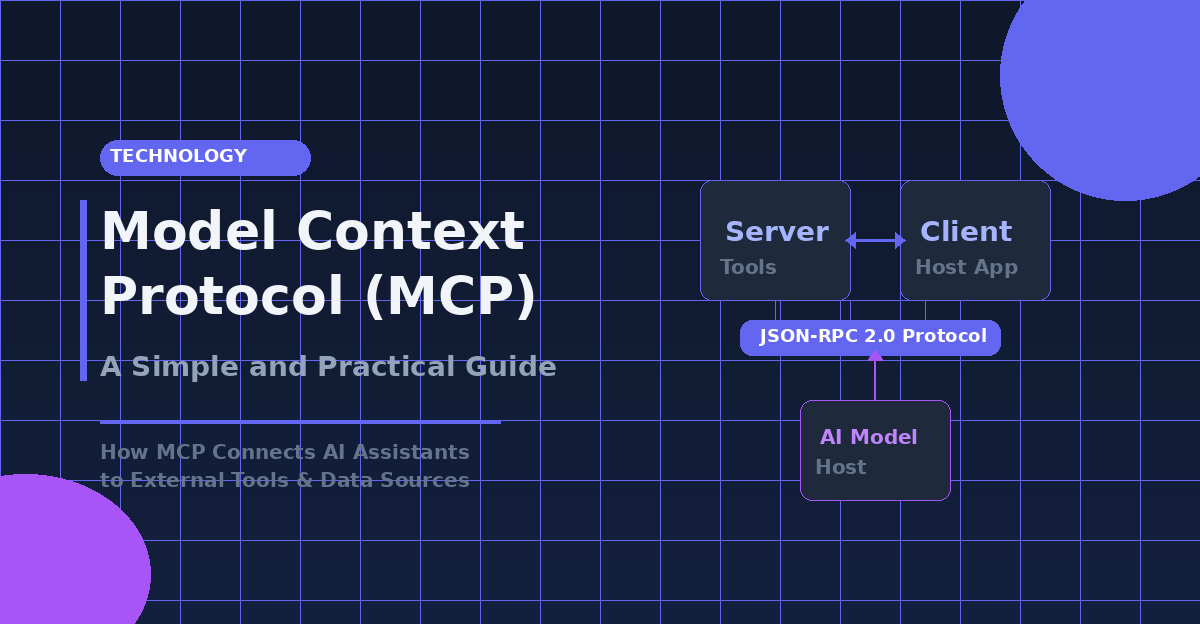
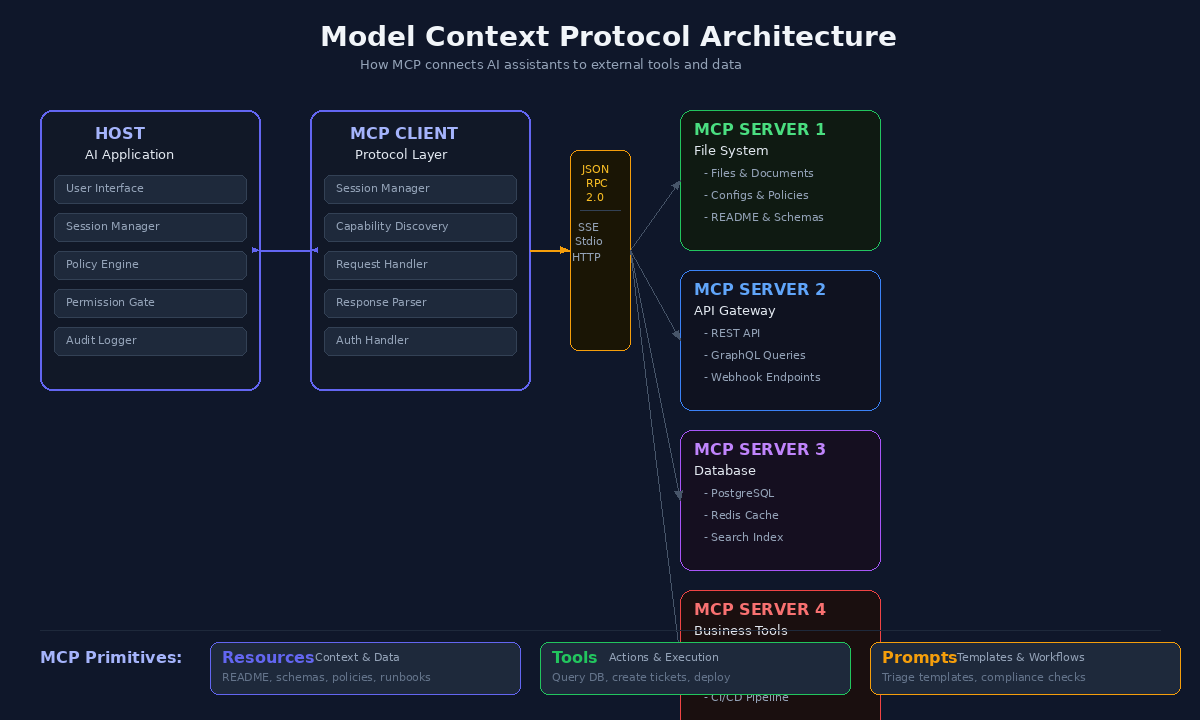
MCP is commonly described with three key components: host, client, and server.
1. Host
The host is the AI application runtime or environment where the user interacts, such as a desktop AI app, IDE assistant, or enterprise AI platform. The host manages permissions, session lifecycle, and policy boundaries.
2. MCP Client
The client is the protocol layer that communicates with MCP servers. It sends requests, receives responses, negotiates capabilities, and manages per-server sessions. A host can connect to multiple servers via separate client sessions.
3. MCP Server
An MCP server exposes specific capabilities to clients. It may provide access to files, APIs, search systems, databases, or internal business logic. A server can run locally or remotely and typically exposes three primitives: resources, tools, and prompts.
Transport and Messaging
MCP communication typically uses JSON-RPC style message patterns over supported transports such as stdio or HTTP-based channels. This gives a predictable request-response model and makes tracing easier.
The Three MCP Primitives You Must Understand
Resources
Resources are contextual data objects exposed by a server. Think of them as read-oriented information sources an AI system can consume. Examples include a project README, an API schema, a runbook, a product catalog, or a policy document.
Resources help AI systems answer with better context and lower hallucination risk. Instead of guessing from model memory, the AI can retrieve current, relevant data.
Tools
Tools are executable functions. They let the AI perform actions like querying a database, creating a ticket, running a deployment command, validating an invoice, or posting a notification. Tools are where MCP shifts AI from passive text generation to active workflows.
Good tool design includes strict parameter schemas, permission checks, and deterministic behavior for predictable outputs.
Prompts
Prompts in MCP are reusable templates and workflow instructions exposed by servers. They can encode best practices for recurring tasks such as incident triage, root cause analysis, release notes drafting, or compliance checks.
Prompt primitives improve consistency and reduce prompt engineering duplication across teams.
Why MCP Matters for Enterprise AI
MCP is not just a developer convenience. It changes how organizations can design AI systems at scale.
Standardization
Teams can unify integration patterns instead of building one-off adapters. This improves governance, quality control, and cross-team collaboration.
Faster Delivery
When protocol and capability discovery are standardized, adding new tool integrations is faster. Teams spend less time wiring connectors and more time building product logic.
Better Reliability
Consistent request contracts and error patterns reduce production surprises. Monitoring and alerting become more meaningful when interaction paths follow the same protocol model.
Security and Compliance Alignment
MCP encourages explicit capability exposure. Servers can expose only what is needed, and hosts can enforce user consent, logging, and policy boundaries. This supports auditability and least-privilege access.
Vendor Flexibility
MCP reduces lock-in risk by separating tool connectivity from model-specific custom glue code. Organizations can evolve model providers while preserving integration investments.
Real-World MCP Use Cases
1. Developer Assistant in an Engineering Organization
An AI assistant in an IDE can connect via MCP to:
- Code repositories for context resources
- Issue tracker tools for ticket actions
- CI/CD systems for build status checks
- Documentation servers for runbooks and standards
Result: the assistant can answer architecture questions with repository context, open issues, suggest fixes, and summarize failing pipelines without custom integrations per system.
2. Security Operations Copilot
A SOC assistant can use MCP to query SIEM data, enrich indicators, open incident tickets, and invoke containment workflows. Security teams benefit from faster triage, structured action trails, and reduced context switching.
3. IT Service Desk Automation
An internal AI service desk can classify requests, retrieve policy resources, execute approved account workflows, and update ITSM systems through MCP tools.
4. Finance and Operations Support
A finance assistant can retrieve ledger context, validate invoice fields, trigger exception workflows, and generate compliance-ready summaries using MCP resources and tools.
Model Context Protocol vs Traditional API Integration
MCP does not replace APIs. It standardizes how AI systems interact with capabilities often implemented behind APIs. Think of APIs as the services and MCP as the AI-facing protocol layer.
- Traditional approach: AI app directly integrates each API with custom logic.
- MCP approach: MCP server encapsulates service capabilities and exposes them through standard primitives.
This separation improves maintainability and makes AI orchestration cleaner.
Model Context Protocol and Retrieval-Augmented Generation (RAG)
RAG helps models answer using external documents, but many RAG systems focus only on retrieval. MCP expands this by combining retrieval with action and workflow structure.
With MCP, an agent can:
- Retrieve policy documents (resources)
- Run validation checks (tools)
- Apply a standardized response template (prompts)
This creates end-to-end task completion, not just better answers.
Security Best Practices for Model Context Protocol Implementations
MCP increases AI capability, which means security design is mandatory from day one. Use these controls as baseline:
Least Privilege Exposure
Expose only required tools and resources. Avoid broad administrative endpoints in general-purpose servers.
Strong Authentication and Authorization
Apply identity-aware access controls and map user identity to tool permissions. Keep service credentials scoped and rotated.
Explicit User Consent for Sensitive Actions
Require confirmation for irreversible or high-impact operations such as deleting records, changing access rights, or triggering production workflows.
Audit Logging
Log who invoked which tool, with what parameters, and what outcome occurred. This is essential for forensic analysis and compliance reporting.
Input and Output Validation
Validate tool parameters against strict schemas. Sanitize and structure outputs to reduce injection and misuse risk.
Rate Limiting and Abuse Controls
Protect servers from overuse or malicious automation by enforcing throttling and anomaly detection rules.
Common Model Context Protocol Implementation Mistakes to Avoid
- Exposing too many tools too early: Start small with high-value capabilities and expand in controlled phases.
- Skipping schema discipline: Loose parameter design causes unstable behavior and higher failure rates.
- No error taxonomy: Without consistent error codes and messages, debugging becomes expensive.
- No observability: If you cannot trace tool calls end to end, production support becomes guesswork.
- Ignoring fallback design: Plan behavior when resources are unavailable or tools time out.
A Practical Model Context Protocol Adoption Roadmap
Phase 1: Identify High-Impact Workflows
Choose one or two workflows where AI value is clear and measurable, such as incident triage or internal documentation search with action execution.
Phase 2: Build a Minimal MCP Server
Expose a focused set of resources and one or two tools. Keep interfaces simple and deterministic.
Phase 3: Add Security and Observability Baselines
Implement auth, authorization mapping, audit logs, request tracing, and error metrics before broad rollout.
Phase 4: Integrate with Host Applications
Connect your server to an MCP-capable host and test real user journeys with controlled groups.
Phase 5: Expand Capabilities Gradually
Add new tools, prompts, and resource domains based on usage data and reliability outcomes.
Phase 6: Establish Governance
Define ownership model, change management, versioning policy, and server certification checklist for production.
How Teams Measure Model Context Protocol Success
Use measurable indicators instead of assumptions:
- Integration lead time reduction
- Tool invocation success rate
- Average response quality improvement in assisted workflows
- Incident mean time to resolution for AI-assisted operations
- Reduction in custom connector maintenance effort
- Security/audit compliance completeness for AI actions
Future Direction: Why the Model Context Protocol Is Likely to Grow
AI products are moving toward multi-tool and multi-agent systems. As this grows, protocol standardization becomes more important, not less. Teams will need predictable orchestration, enforceable controls, and reusable capability contracts across models and business domains.
MCP aligns with this direction by offering a shared language for context and action. It supports modular architecture, clearer governance, and scalable development practices. Even as model capabilities improve, external systems will remain essential for real-world AI utility. That keeps MCP relevant.
Conclusion
The Model Context Protocol represents a fundamental shift in how AI systems interact with the real world. Rather than treating every external integration as a bespoke engineering effort, MCP establishes a universal, open standard that lets AI models discover, authenticate with, and invoke external tools and data sources through a consistent interface.
Throughout this guide, we have explored MCP’s architecture — its host-client-server model, its three core primitives (resources, tools, and prompts), and its transport layer built on JSON-RPC 2.0. We have examined real-world use cases across developer assistants, security operations, IT service desks, and finance. We have also addressed the security considerations that any production implementation must account for, from least-privilege exposure to audit logging and rate limiting.
What makes MCP particularly significant is its timing. As organizations move beyond proof-of-concept AI chatbots toward production-grade copilots and autonomous workflows, the integration bottleneck becomes the primary obstacle. MCP directly addresses this bottleneck by providing a standardized protocol that works across models, platforms, and vendors. Teams that adopt MCP early gain a measurable advantage: faster delivery cycles, reduced maintenance burden, stronger security posture, and the flexibility to swap underlying AI models without rewriting integrations.
MCP is not hype — it is infrastructure. And infrastructure is what separates AI experiments from AI systems that deliver consistent, reliable value at scale. If your organization is building AI assistants, copilots, or autonomous workflows, MCP deserves serious evaluation. Start with one focused use case, implement strong security controls, and expand through measurable outcomes.
Frequently Asked Questions
What is the Model Context Protocol (MCP)?
MCP is an open standard developed by Anthropic that provides a universal way for AI models to connect with external data sources and tools. Instead of building custom integrations for each AI application, MCP defines a standardized protocol that any AI system can use to access files, databases, APIs, and other resources securely.
How does MCP differ from traditional APIs?
While traditional APIs require custom code for each integration, MCP provides a standardized client-server architecture with built-in capabilities for authentication, resource discovery, and tool invocation. MCP servers act as middleware that can be reused across any MCP-compatible AI application, dramatically reducing integration overhead.
What are MCP servers and how do they work?
MCP servers are lightweight programs that expose specific capabilities (like file access, database queries, or web search) to AI clients. They communicate using JSON-RPC 2.0 over stdio or Streamable HTTP transport (earlier revisions used HTTP with SSE). Each server declares its tools, resources, and prompts, allowing AI models to discover and use them dynamically.
Reference: MCP Official Specification
Reference: MCP GitHub Repository
Part of our AI Agent Security: The Complete Guide (2026) series.