
You are currently viewing WHAT is MCP (Model Context Protocol)

WHAT is MCP (Model Context Protocol)

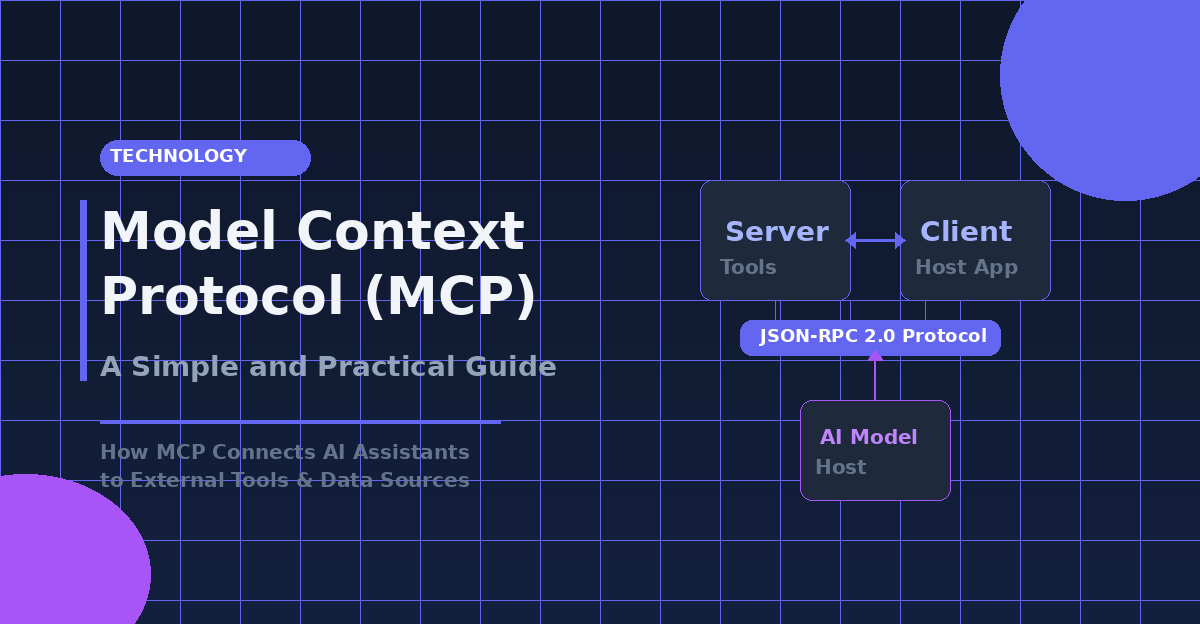
Model Context Protocol (MCP) is an open standard that connects AI systems to external data sources, tools, and services through a unified protocol. This standardization layer eliminates the need for custom integrations with each data source, allowing AI models to access real-time information and expand their capabilities beyond basic text generation.

MCP targets AI developers, enterprise teams, and organizations building AI agents who struggle with fragmented tool integrations and inconsistent data access patterns. The protocol addresses common challenges like tool execution errors, output parsing issues, and the complexity of maintaining multiple custom connections between AI systems and external services.

This guide explores how MCP functions as a standardization layer for AI systems, enabling seamless communication between models and external resources. Next, we’ll examine MCP’s core architecture and its three main components—hosts, clients, and servers—that work together to facilitate data exchange. Finally, we’ll cover the three types of data exposure MCP servers provide (resources, tools, and prompts) and discuss practical implementation strategies for getting started with MCP integration.

Understanding MCP as a Standardization Layer for AI Systems

Defining Model Context Protocol as a Universal Connection Standard

The Model Context Protocol (MCP) represents a groundbreaking standardization effort introduced by Anthropic in November 2024, designed to address one of the most persistent challenges in AI system integration. As an open standard and open-source framework, MCP establishes a universal interface that enables artificial intelligence systems, particularly large language models (LLMs), to seamlessly integrate and share data with external tools, systems, and diverse data sources.

This standardization approach directly tackles what Anthropic describes as the “N×M” data integration problem, where each AI application traditionally required custom connectors for every data source it needed to access. Before MCP’s introduction, developers faced the daunting task of building bespoke integrations for each combination of AI system and data source, resulting in fragmented architectures that were difficult to scale and maintain.

MCP fundamentally transforms this landscape by providing a single protocol specification that supports reading files, executing functions, and handling contextual prompts across different platforms. The protocol deliberately reuses message-flow concepts from the Language Server Protocol (LSP) and operates over JSON-RPC 2.0, with formal specifications for stdio and HTTP transport mechanisms. This architectural decision ensures both familiarity for developers and robust communication channels between AI systems and external resources.

Comparing MCP to USB-C Ports for Hardware Connectivity

The analogy between MCP and USB-C connectivity perfectly illustrates the protocol’s revolutionary impact on AI system architecture. Just as USB-C eliminated the need for multiple proprietary charging cables and connection standards across devices, MCP serves as the “USB-C for AI,” creating a unified connection standard that removes the complexity of managing numerous custom integrations.

This comparison extends beyond mere convenience. USB-C’s success stems from its ability to provide a single port that handles power delivery, data transfer, and video output across countless devices from different manufacturers. Similarly, MCP creates a standardized framework where developers can expose data through MCP servers or build AI applications (MCP clients) that connect to these servers, regardless of the underlying systems or data sources involved.

The protocol’s adoption by major AI providers, including OpenAI and Google DeepMind following its announcement, demonstrates the industry’s recognition of MCP’s potential to become the universal standard for AI tool integration. This rapid uptake mirrors the hardware industry’s swift adoption of USB-C, suggesting that MCP addresses a fundamental need for standardization in the AI ecosystem.

Addressing Common AI Agent Integration Challenges

MCP directly confronts several critical challenges that have historically plagued AI agent integration efforts. The most significant of these is the information silo problem, where valuable data remains trapped behind incompatible systems and legacy architectures. Traditional approaches required developers to create vendor-specific connectors for each data source, leading to maintenance nightmares and scalability issues.

The protocol’s architecture enables secure, bidirectional connections between data sources and AI-powered tools, addressing security concerns that often arise in AI system integrations. Through standardized specifications for data ingestion, transformation, and contextual metadata tagging, MCP ensures that AI systems can access relevant information while maintaining appropriate security boundaries and access permissions.

Furthermore, MCP’s open standard approach allows organizations to build tailored connections for proprietary systems while maintaining compatibility with the broader ecosystem. This flexibility is particularly valuable for enterprises with complex data landscapes, as it enables AI systems to provide domain-specific assistance without compromising data governance requirements. The protocol’s support for software development kits in Python, TypeScript, C#, and Java further reduces implementation barriers, making it accessible to development teams across different technology stacks.

Expanding AI Capabilities Beyond Basic LLM Functions

Recognizing Limited Standalone LLM Capabilities

Large Language Models like GPT-4 and LLAMA demonstrate remarkable text generation, reasoning, and summarization abilities, yet they face significant constraints when operating independently. These models excel at processing and generating human-like text but cannot access real-time information, interact with external systems, or perform actions beyond their training data boundaries.

The fundamental limitation stems from LLMs being trained on static datasets with knowledge cutoffs, preventing them from retrieving current information or adapting to dynamic environments. While these models can reason through complex problems and provide sophisticated responses, they cannot fetch live data from databases, make API calls to external services, or execute computational tasks that require external resources.

This recognition has driven the development of standardized protocols like MCP (Model Context Protocol) to bridge the gap between LLM capabilities and real-world application requirements. Without external tool integration, LLMs remain isolated systems with impressive but ultimately constrained functionality.

Integrating External Tools for Real-Time Information Access

External tool integration transforms LLMs from static text generators into dynamic, action-capable systems. This integration process involves designing frameworks that allow LLMs to decide when to invoke external tools during inference and incorporate tool outputs back into response generation.

Advanced models such as LLAMA 3.1, OpenAI’s GPTs, and Anthropic’s Claude are specifically designed to work with external tools through structured tool definitions. These definitions include the tool’s name, description of functionality, and required input parameters, enabling seamless communication between the LLM and external systems.

The integration methodology follows a systematic approach: the LLM receives a user query, analyzes the request to determine if external tool usage is necessary, generates structured output indicating the specific tool to invoke, and then incorporates the tool’s results into the final response. This process enables access to retrieval systems, calculators, knowledge bases, APIs, and embedded modules that supplement the model’s internal knowledge.

Key benefits of external tool integration include increased factual accuracy, expanded knowledge scope beyond training data limitations, and improved task performance across diverse applications. The implementation involves prompting techniques that guide the LLM’s decision-making process for tool invocation and result incorporation.

Building Context-Aware AI Agents with Enhanced Tool Usage

Context-aware AI agents represent the evolution of basic LLM functionality through sophisticated tool integration frameworks. These agents leverage step-by-step reasoning with tool calls, including retrieval and verification steps, to provide comprehensive and accurate responses to complex queries.

The development of context-aware agents involves implementing processing systems that can handle multiple tool interactions within a single workflow. For instance, a customer support agent might first use a user lookup tool to identify a customer, then access order management tools to retrieve purchase history, and finally execute cancellation functions based on order status verification.

Tool integration enables agents to perform complex computations, automate tasks, and maintain context across multiple interactions. The system design includes structured tool definitions that specify function names, descriptions, parameters, and execution requirements, allowing agents to dynamically select appropriate tools based on context and user requirements.

Enhanced tool usage patterns demonstrate how agents can chain multiple tool calls together, creating sophisticated workflows that mirror human problem-solving approaches. This capability transforms LLMs from simple text generators into intelligent agents capable of performing real-world tasks, accessing live information, and maintaining contextual awareness throughout extended interactions.

The implementation of context-aware agents requires careful consideration of tool selection logic, error handling, and result integration to ensure reliable and accurate performance across diverse application scenarios.

MCP Architecture and Core Components


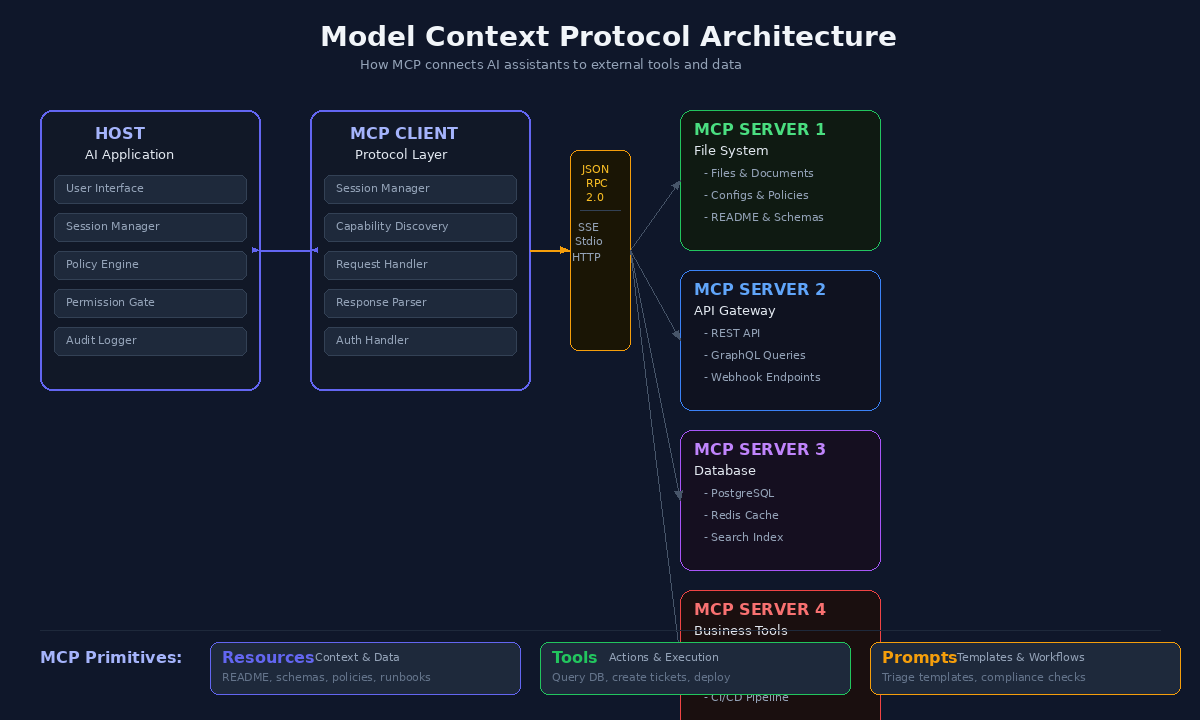
The Model Context Protocol follows a sophisticated client-host-server architecture that enables seamless AI standardization and LLM integration across diverse applications. This architecture maintains clear security boundaries while facilitating robust communication between AI systems and external services through JSON-RPC messaging.

Understanding the MCP Host as the AI Application Layer

The host process serves as the central coordinator and container within the MCP architecture, acting as the primary AI application layer. Host applications, such as Claude Desktop or integrated development environments, create and manage multiple client instances while controlling their connection permissions and lifecycle management.

The host enforces critical security policies and consent requirements, handling user authorization decisions that determine which external services can be accessed. Additionally, the host coordinates AI and LLM integration, managing sampling processes and context aggregation across multiple clients. This centralized approach ensures that the host maintains full control over conversation history and cross-server interactions, preventing unauthorized access to sensitive information.

Utilizing MCP Clients for Request Processing and Session Management

Each MCP client establishes a dedicated, stateful session with a specific server, maintaining a strict 1:1 relationship that ensures isolation between different service connections. Clients handle essential protocol negotiation and capability exchange during initialization, determining which features will be available throughout the session.

The client layer manages bidirectional protocol message routing, processing requests from the host and forwarding responses from servers. Clients maintain subscriptions and notifications while enforcing security boundaries between different servers, ensuring that no server can access information from other connected services. This isolation mechanism is fundamental to the MCP implementation approach, preventing potential security vulnerabilities.

Implementing MCP Servers for External Service Integration

MCP servers provide specialized context and capabilities through well-defined primitives, operating independently with focused responsibilities. Servers expose resources, tools, and prompts via the standardized MCP interface, enabling comprehensive AI tool integration across various external services.

Servers can function as local processes or remote services, offering flexibility in deployment scenarios. They maintain the ability to request sampling through client interfaces while respecting security constraints imposed by the host. The design principle emphasizes that servers should be extremely easy to build, with host applications handling complex orchestration responsibilities while servers focus on specific, well-defined capabilities.

Managing Communication Through JSON-RPC Transport Layer

The MCP architecture utilizes JSON-RPC 2.0 as its foundation for all communication between components, supporting multiple transport mechanisms to accommodate different deployment scenarios. The protocol defines three core message types: requests that expect responses, results indicating successful request completion, and notifications for one-way messaging.

The transport layer supports stdio transport for local process communication and HTTP with Server-Sent Events for remote connections. All message exchanges follow JSON-RPC 2.0 specifications for structure and delivery semantics, ensuring reliable communication patterns. The capability negotiation system allows clients and servers to explicitly declare supported features during initialization, enabling progressive feature addition while maintaining protocol extensibility and backwards compatibility.

Three Types of Data Exposure Through MCP Servers


The Model Context Protocol defines three core primitives that MCP servers can expose to provide contextual information and functionality to AI applications. These primitives represent the fundamental building blocks of how data and capabilities flow from servers to clients within the MCP architecture. Each primitive type serves a distinct purpose in enhancing AI capabilities and follows standardized discovery and retrieval patterns through associated methods.

Accessing Resources for Information Retrieval

Resources represent data sources that provide contextual information to AI applications, serving as the primary mechanism for exposing static and dynamic content. These resources encompass diverse data types including file contents, database records, API responses, and other forms of structured or unstructured information that can enhance AI understanding and decision-making.

MCP servers expose resources through standardized methods that follow the pattern resources/list for discovery and resources/get for retrieval. This design allows resource listings to be dynamic, enabling servers to adapt their available resources based on changing conditions, user permissions, or external data sources. The dynamic nature of resource discovery ensures that AI applications can access the most current and relevant information available through the MCP server.

The resource primitive proves particularly valuable when AI applications need access to contextual data that informs their responses or actions. For instance, an MCP server providing context about a database can expose resources containing the database schema, allowing AI applications to understand the structure and relationships within the data before formulating queries or recommendations.

Using Tools for Actionable Computations and API Requests

Tools constitute executable functions that AI applications can invoke to perform specific actions, representing the active capability layer within the MCP framework. These tools enable AI systems to extend beyond basic language model functions by providing mechanisms for file operations, API calls, database queries, and other computational tasks that require interaction with external systems or services.

The tool primitive follows a three-method pattern: tools/list for discovering available tools, tools/get for retrieving detailed tool specifications, and tools/call for executing the actual functionality. This comprehensive approach ensures that AI applications can understand both the availability and requirements of each tool before attempting execution, promoting reliable and predictable interactions.

Tools represent the actionable component of MCP servers, transforming AI applications from purely conversational systems into capable agents that can perform concrete tasks. The standardized tool interface allows developers to create modular functionality that can be easily integrated into various AI applications without requiring custom integration code for each implementation.

Implementing Prompts as Reusable Templates and Workflows

Prompts serve as reusable templates that help structure interactions with language models, providing standardized approaches to common AI interaction patterns. These prompts can include system prompts that establish context and behavior guidelines, few-shot examples that demonstrate desired response formats, and structured workflows that guide complex multi-step processes.

The prompt primitive utilizes discovery and retrieval methods following the prompts/list and prompts/get pattern, allowing AI applications to access pre-configured interaction templates that have been optimized for specific use cases or domains. This systematic approach to prompt management ensures consistency across different AI interactions while reducing the need for applications to maintain their own prompt libraries.

MCP prompts enable the encapsulation of domain expertise and interaction patterns within the server infrastructure, allowing AI applications to benefit from specialized knowledge without requiring deep understanding of specific domains. This separation of concerns promotes more maintainable and scalable AI system architectures while ensuring that prompt optimization can occur at the server level rather than being distributed across multiple client applications.

The three primitive types work together to create a comprehensive framework for AI capability enhancement. Resources provide the informational foundation, tools enable actionable capabilities, and prompts structure the interaction patterns, collectively transforming basic language models into sophisticated AI systems capable of complex reasoning and task execution within specialized domains.

Key Benefits and Real-World Applications of MCP

Now that we have explored the architecture and components of the Model Context Protocol, it becomes essential to examine the tangible advantages and practical implementations that make MCP a transformative force in AI standardization. The benefits of adopting MCP extend far beyond technical convenience, offering strategic advantages that reshape how organizations approach AI tool integration.

Streamlining Complex Tool Integration and Maintenance

The Model Context Protocol fundamentally addresses the notorious N-by-M integration problem that has plagued AI development teams. Previously, connecting N different models to M tools required building N×M custom connectors, creating an exponentially complex web of maintenance challenges. MCP eliminates this complexity by allowing both sides to implement the protocol once, enabling instant interoperability across the entire ecosystem.

The standardization benefits manifest immediately in reduced development overhead. Organizations no longer need to maintain fragmented, custom integrations for each tool combination. Instead, MCP provides a universal connector that replaces these disparate systems with a single, open protocol. This approach delivers significant cost-effectiveness through lower maintenance requirements, easier scaling capabilities, and decreased risk associated with custom connector dependencies.

From a strategic perspective, MCP future-proofs infrastructure investments by creating a unified standard that adapts to evolving tool landscapes. Development teams can focus on complex problem-solving rather than boilerplate integration code, as the protocol handles the underlying connectivity requirements automatically. This shift enables organizations to allocate resources more efficiently while maintaining robust, scalable AI implementations.

Enhancing Multiagent System Communication

With the growing complexity of AI ecosystems, MCP serves as a critical enabler for sophisticated multiagent system architectures. The protocol’s standardized primitives facilitate seamless communication between different AI agents, allowing them to share resources, tools, and context in real-time collaborative workflows.

The two-way collaboration capabilities inherent in MCP’s sampling primitive enable both AI agents and external tools to initiate actions whenever needed. This bidirectional communication model transforms static tool interactions into dynamic, responsive systems that can adapt to changing conditions and requirements. Agents can not only retrieve data from various sources but also trigger actions across multiple systems, creating sophisticated automation workflows that span entire organizational infrastructures.

Enterprise applications particularly benefit from this enhanced communication model. For instance, a document workflow agent can simultaneously search company documents using one MCP server while scraping competitor webpages through another MCP server, then merge insights and generate comprehensive summaries in a single, seamless experience. This level of coordination would require substantial custom development without MCP’s standardized communication framework.

Supplementing Retrieval Augmented Generation Workflows

Previously discussed RAG implementations can be significantly enhanced through MCP integration, as the protocol provides standardized access to diverse data sources and processing tools. Instead of direct function calls or database queries, RAG systems can leverage HTTP requests to MCP endpoints, creating more scalable and maintainable architectures.

The protocol’s resource primitive enables structured data objects to remain available in the model’s context, while the tools primitive allows executable functions like database queries or web scraping to be called dynamically. This combination creates powerful RAG workflows that can access, process, and synthesize information from multiple sources through standardized interfaces.

MCP’s approach to RAG enhancement extends beyond simple data retrieval. The protocol enables real-time access to applications and data, streamlining collaboration and enabling advanced workflows that incorporate live information updates. This capability transforms traditional RAG systems from static knowledge bases into dynamic, responsive information processing networks that adapt to changing data landscapes.

Reducing Development Load and Debugging Requirements

The implementation of MCP significantly reduces the traditional burdens associated with AI system development and maintenance. By providing standardized interfaces and protocols, MCP eliminates much of the custom coding typically required for tool integration, allowing development teams to concentrate on higher-value activities.

The protocol’s built-in monitoring and logging capabilities provide comprehensive visibility into model execution, usage metrics, and performance characteristics. Every interaction is recorded with detailed metadata, enabling developers to track which versions were used, execution times, input parameters, and output results. This level of transparency dramatically simplifies debugging processes and facilitates continuous optimization efforts.

Enhanced development productivity emerges from MCP’s ability to automate traditionally manual processes. Code review, document generation, and bug prediction can be streamlined through standardized tool interfaces, while deployment and scaling operations become significantly more straightforward. The protocol’s secure, two-way connections ensure that AI agents can interact with systems in real-time while maintaining appropriate access controls and audit trails.

Security considerations are built into MCP’s architecture, providing unified standards that reduce the attack surface associated with multiple custom integrations. Organizations benefit from improved user experiences through context-rich results, while maintaining the governance and compliance requirements essential for enterprise AI deployments.

Getting Started with MCP Implementation

With this understanding of MCP architecture and benefits in mind, the next step involves practical implementation approaches. The Model Context Protocol offers multiple pathways for integration, ranging from utilizing existing solutions to building custom implementations that address specific organizational needs.

Installing Pre-built MCP Servers Through Claude Desktop

Organizations seeking immediate access to MCP capabilities can leverage pre-built MCP servers through Claude Desktop integration. This approach provides the most straightforward entry point for implementing the Model Context Protocol without requiring extensive development resources. Pre-built servers offer standardized functionality that addresses common use cases, enabling teams to quickly explore MCP’s potential within their existing workflows.

The Claude Desktop implementation serves as an excellent starting point for understanding how MCP functions in practice. Teams can evaluate various pre-built servers to identify those that align with their specific data access and integration requirements. This method allows for rapid prototyping and proof-of-concept development before committing to more complex custom implementations.

Building Custom MCP Servers Using Available SDKs

For organizations requiring specialized functionality, building custom MCP servers represents the optimal approach for MCP implementation. Available SDKs provide the necessary tools and frameworks to develop servers that meet specific business requirements and integrate with existing systems.

Custom MCP server development enables precise control over data exposure patterns, security implementations, and integration protocols. The available SDKs streamline the development process by providing standardized interfaces and communication patterns, reducing the complexity typically associated with building custom integration solutions.

Development teams can leverage these SDKs to create servers that expose resources, tools, and prompts according to their organization’s specific needs. This approach ensures that MCP implementation aligns perfectly with existing infrastructure while maintaining the protocol’s standardization benefits.

Contributing to Open-Source MCP Repositories and Communities

Active participation in open-source MCP repositories and communities represents a strategic approach to MCP implementation that extends beyond immediate organizational benefits. Contributing to these communities provides valuable insights into best practices, emerging patterns, and protocol evolution.

The MCP community offers opportunities to influence the protocol’s development while gaining access to collective knowledge and shared implementations. Organizations that engage with these communities often discover solutions to common challenges and can leverage community-developed components to accelerate their own implementation efforts.

Joining the MCP community enables teams to stay informed about protocol updates, participate in discussions about future enhancements, and access support from other implementers. This collaborative approach to MCP implementation ensures that organizations remain aligned with industry standards while contributing to the protocol’s continued development and adoption across the AI ecosystem.

Industry Adoption and Future of Standardized AI Tool Integration


Early Adopter Success Stories from Block and Apollo

The Model Context Protocol has already demonstrated tangible benefits across various industry implementations. Organizations utilizing Anthropic MCP Core in Claude Desktop have experienced a remarkable 30% boost in productivity, showcasing the protocol’s immediate impact on developer workflows. Financial institutions have particularly benefited from MCP integration, with one financial firm achieving a 15% improvement in trading predictions by leveraging Spring AI MCP to connect Large Language Models to real-time stock data.

The healthcare sector has also seen significant improvements through MCP standardization. A healthcare provider utilizing Microsoft’s MCP implementation for Azure OpenAI successfully linked patient records to AI diagnostic tools, resulting in a 40% reduction in analysis time. These early success stories highlight the protocol’s versatility across different industries and its capacity to deliver measurable improvements in operational efficiency.

Development Tool Integration by Zed, Replit, and Sourcegraph

The development ecosystem has embraced MCP as a transformative standardization layer, with leading tools implementing comprehensive integration capabilities. The protocol’s architecture enables dynamic tool discovery and secure two-way communication, making it particularly attractive for development environments. Pre-built servers for essential tools like Google Drive, Slack, and GitHub have facilitated widespread adoption among development teams.

Current MCP implementations feature client-server architecture that supports real-time data processing and edge computing capabilities. This architecture proves especially valuable for autonomous vehicles processing sensor data, smart city infrastructure managing IoT devices, and centralized management of IoT ecosystems including traffic sensors and surveillance systems. The scalability and reliability features inherent in MCP servers make them suitable for distributed computing environments.

Scaling Connected AI Systems with Sustainable Architecture

Future trends in MCP implementation point toward increasingly sophisticated infrastructure capabilities. Autonomous self-healing infrastructure utilizing machine learning enables real-time detection, diagnosis, repair, and anomaly detection to minimize downtime while increasing system reliability. Quantum-enhanced AI processing represents another significant advancement, leveraging quantum computing principles for exponentially faster calculations and reduced energy consumption by up to 90%.

Edge-to-core intelligent orchestration through MCP enables effective workload management across distributed environments, supporting IoT, 5G, and emerging applications. Market projections indicate this sector will reach $10 billion by 2025, driven by demand for autonomous vehicles and smart city implementations.

Neural Architecture Search (NAS) for server optimization allows AI systems to design and adapt architecture based on workload requirements, improving performance by up to 15% while reducing latency and enhancing scalability. Sustainable AI-driven power management employs advanced algorithms for dynamic power allocation, thermal management, and resource utilization, reducing energy consumption by up to 20% and carbon emissions by up to 15%.

The organizational landscape will require specialized roles including AI Engineers, Data Scientists, and MCP Architects, supported by cross-functional teams skilled in programming languages like Python and Java, cloud platforms such as Azure and AWS, and security frameworks. By 2025, MCP is expected to serve as a cornerstone in AI integration, reducing integration complexity and costs while enabling scalable, real-time, context-aware AI systems across healthcare, finance, and smart city applications.

The Model Context Protocol represents a pivotal advancement in AI development, addressing one of the most significant challenges facing modern AI systems: isolated data access. By establishing a standardized layer for AI-tool integration, MCP eliminates the fragmented approach that has historically limited the scalability and effectiveness of AI applications. This protocol enables seamless communication between AI models and external services, transforming basic language models into powerful, context-aware agents capable of accessing real-time information and performing complex tasks.

As the AI industry continues to evolve, MCP’s role as the “USB-C for AI applications” becomes increasingly critical. The protocol’s ability to streamline tool integration, enhance multiagent orchestration, and supplement retrieval augmented generation positions it as an essential component for organizations seeking to deploy sophisticated AI systems at scale. With early adoption by companies like Block and Apollo, and integration support from development platforms including Zed, Replit, and Sourcegraph, MCP is already demonstrating its value in real-world applications. For developers and organizations looking to harness the full potential of AI, implementing MCP offers a future-proof foundation that prioritizes standardization, reliability, and sustainable growth in an increasingly connected AI ecosystem.